User Defined Spreadsheet Functions in Excel
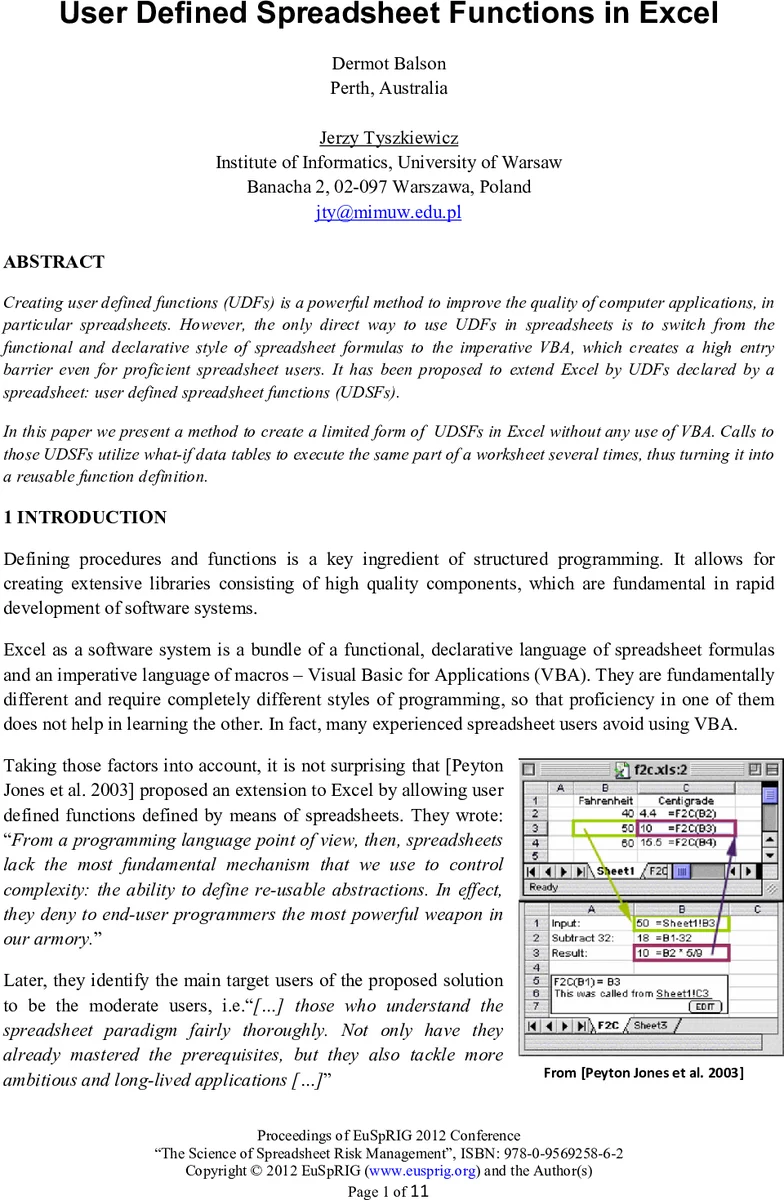
Creating user defined functions (UDFs) is a powerful method to improve the quality of computer applications, in particular spreadsheets. However, the only direct way to use UDFs in spreadsheets is to switch from the functional and declarative style of spreadsheet formulas to the imperative VBA, which creates a high entry barrier even for proficient spreadsheet users. It has been proposed to extend Excel by UDFs declared by a spreadsheet: user defined spreadsheet functions (UDSFs). In this paper we present a method to create a limited form of UDSFs in Excel without any use of VBA. Calls to those UDSFs utilize what-if data tables to execute the same part of a worksheet several times, thus turning it into a reusable function definition.
💡 Research Summary
The paper addresses a long‑standing limitation of Microsoft Excel: the inability to define reusable functions directly within the spreadsheet paradigm without resorting to Visual Basic for Applications (VBA). While VBA offers an imperative way to create user‑defined functions (UDFs), it imposes a steep learning curve on end‑users who are accustomed to the declarative, formula‑driven nature of spreadsheets. Building on the earlier proposal by Peyton Jones et al. (2003) to allow “user‑defined spreadsheet functions” (UDSFs), the authors present a practical technique that leverages Excel’s built‑in What‑If analysis tool – data tables – to emulate function calls.
The core idea is to treat a small 2 × 2 data table as a single function invocation. The left‑hand cell of the table supplies an input value to a designated input cell (e.g., A2) on a separate worksheet that contains the function’s implementation. Excel then recomputes all dependent cells, and the result from a predefined output cell (e.g., D2) is placed in the right‑hand cell of the table. By repeating this structure, the same “function body” can be executed repeatedly with different arguments, achieving modularity without any VBA code.
A concrete example is the validation of ISBN numbers (both ISBN‑13 and ISBN‑10). The authors construct the validation logic on a sheet named “ISBNcheck”, with A2 as the input cell and D2 returning “valid” or “invalid”. To call this logic multiple times, they create a series of data tables, each feeding a different ISBN candidate into A2 and capturing the result. Because a data table can only accept a single scalar input, the paper introduces a “call‑by‑reference” technique: instead of passing the raw value, the caller passes a textual reference to a range (e.g., “A5:D5”). Inside the function, INDIRECT, OFFSET, or INDEX retrieve the actual values, allowing the function to work with multi‑cell arguments such as the four blocks of an ISBN‑10 code.
The authors further explore how to package such functions into a reusable library workbook (lib.xlsx). Each function occupies its own sheet with clearly marked input and output cells. A user working in a separate workbook (Book2.xlsx) links the library’s input cell to a local cell via an external reference (e.g., =
Comments & Academic Discussion
Loading comments...
Leave a Comment