Comparison of Spreadsheets with other Development Tools (limitations, solutions, workarounds and alternatives)
The spreadsheet paradigm has some unique risks and challenges that are not present in more traditional development technologies. Many of the recent advances in other branches of software development have bypassed spreadsheets and spreadsheet develope…
Authors: Simon Murphy
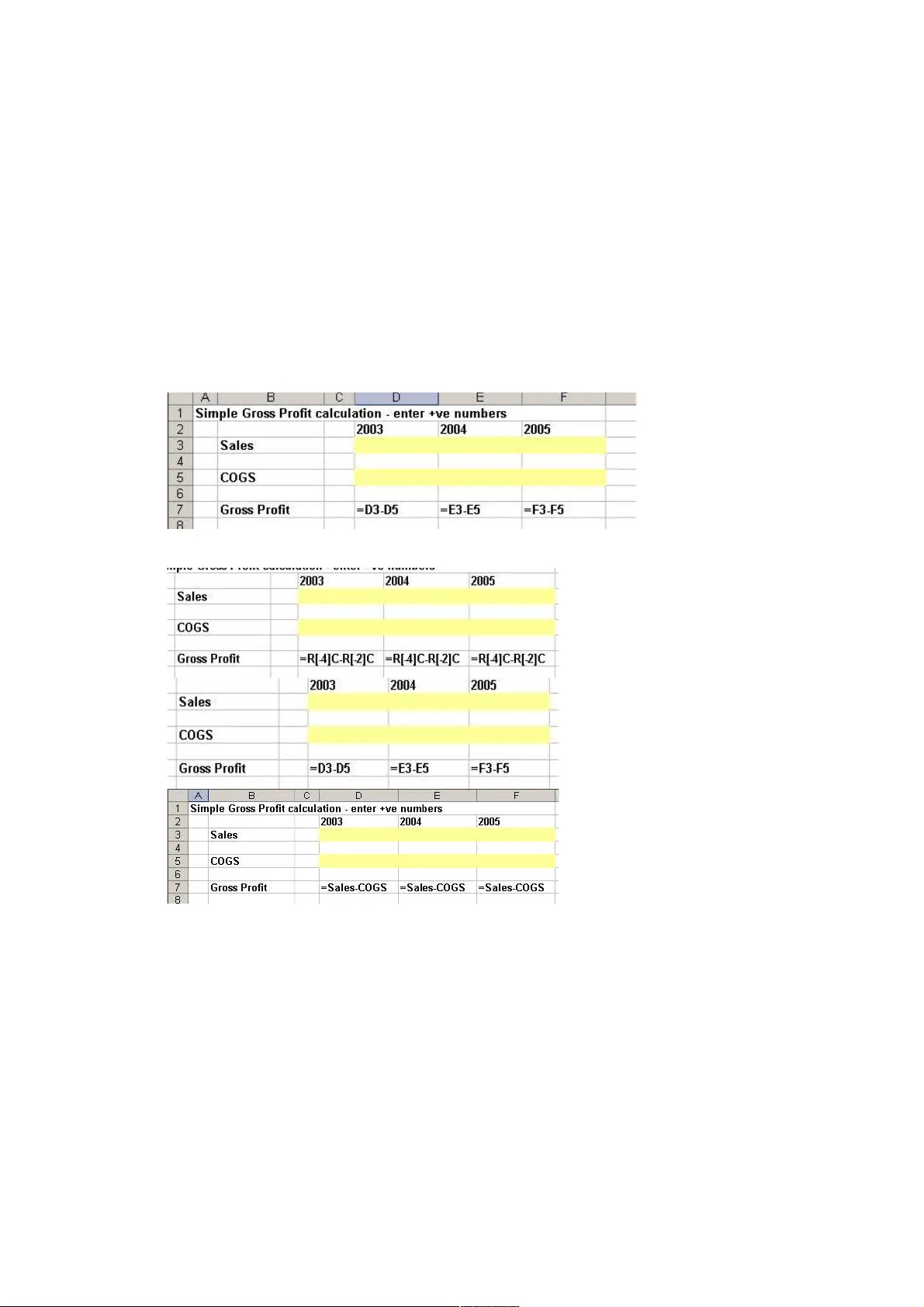
Comparison of Spreadsheets wi th other dev elopment tools (l imitations, sol utions, w orkarounds and alternativ es) Simon Murphy, Codematic Limited, Kinkry Hill Hou se Roadhead Carlisl e UK simon.murphy@codematic.net ABSTRACT The spreadsheet paradigm has som e unique risks and challenges that are not present in mo re traditional development tech nologies. Many of the recent advances i n other branches of softwa re development have bypassed spreadsheets an d spreadsheet developers. This paper compares spreadsheets and spreadsheet development to m ore traditional platforms s uch as databases and procedur al lan guages. It also considers the fundame ntal dange r introduced in the transitio n from paper spreadsheets to electronic. Suggest ions are made to mana ge the risk s and work around the lim itations. 1. INTRODUCTION “400 Million users cant be wron g!” (Microsof t, 2 005) Spreadshe et usage is almost universal (or end em ic – depending on your view point ). If cashflo w is the lif eblood of busin ess, spread sheets a re the language. They enjoy rat her more widespread use than the paper original ever did. They ar e curren tly used for analysing, modelling, repor ting an d forecasting billio ns and bil lions of pounds worth of business transacti ons dail y. There is no evidenc e of widesp read busin ess colla pses due to spre adsheet errors ( but the od d bankruptcy has been known). Spreadshe ets a re being used f or more and more ambitious project s, many are wel l beyond that envisaged by the origina l creator s in the 70’s. Are we beyond the l imit? In the 70’s ‘Garbage In, Garbage Out’ was the st andard. In 2005 th at is ju st not acceptabl e ‘Garbage In, Error message out’ or possi bly even better ‘No Garbage in’ is the modern standar d. (McConnel l, 2004) This paper compares spreadsheet s to other develo pment tools, lo oks at some of the problems a ssociated with spreadsh eets as a development platform and s uggests workarounds and solutions. 2. COMPARISI ONS WITH OTH ER TOOLS Select by location not value. Paper spre adsheets have 1 mode of acces s, by the use r, by value (you look down the title column looking for the text that descr ibes the items you want). Electroni c spreadsh eets have 2 modes of acces s – t he same user mode, by value, and t he underlying, formula based, ‘by loc ation’ access mode. T his disconn ect is unique to electro nic sprea dsheet s and is a fundamental weak ness that guarantees fr agile systems. This duality is a significa nt barri er to understandi ng and auditin g non trivial spreadshe ets. Simple Demo: Are the Gross Profit formulas correct? What abo ut these? (Yes, No, No and No) The ac tual (no t apparent ) spat ial rela tionship is cr itical to under standing and testing a spreadshe et. The appearanc e and layou t are ir relevant at best, and often downright misleading. R ow and column headers must be visible to underst and the model. The connectio n between meaningful label s and ex ecutable logic is coincidenta l. Alterna tive development p latforms such as databases rely on a select by value approach. As in ‘SELEC T * FROM PL WHERE L ineItem = “Sales”’. This is much more robust. The h uman readable labels are used by the so ftware. Type Safe Type safety is a contr act tha t a program will not perform an operation on a variable that is not valid for that data type. Modern languages are more an d more rigorously type saf e. Most compile rs will warn of a n attempt to as sign a string val ue to a numerica l data type. Spreadshe ets have no rea l comprehens ion of data types, you can put anything in any cell . Scope Modern programm ing best pr actice recommends minimising the visibili ty of variabl es. Block scope is preferr ed to ro utine, which is pre ferred to module which is preferred to global dat a. If an applicat ion real ly needs global data to funct ion, this is a strong sign of significan t design fla ws (McConn ell, 20 04). In a spreadshee t, cell s have global read visibili ty. Any other cell anywhere c an see th e value in any cell. This prevents the reliabl e use of information hiding and interface programmin g. E rwig suggests this global visibili ty puts sprea dsheets in the same category as assembly language (Erw ig, 2004). Data separat ion In N- Tier architect ures there is the dat a tier, the busin ess logic ti er(s) and presen tation tier. This separation allows e ach part to be o ptimised for its part icular purpose , and minimises the effects of changes. In a spread sheet everythin g is commonly lumped together, and presenta tion requirements often take priority ov er documenting complex business rules. Security Server based archit ectures are inhe rently more secure than desktop, and compiled binarie s are di fficu lt to modify malicious ly or accid entally. Mode rn data bases provide role b ased security tha t c an be integra ted with the operat ing system and appli ed at th e record or field level. Workshe et prote ction is trivial to bypass, and oft en count er productiv e, workbook open protectio n is irrelevant if the user n eeds to open the workbook to use it. Scalabili ty A program routine is writt en once and used many times, whereas each sprea dsheet cell needs its own version of a formula. A VB program to take some numbers and add them is much more complex than a spreadshe et ‘SUM ()’ formula. But the VB code to sum a thousand sets of numbers has the same complexity, a spread sheet would have 1,000 formulas, e ach needing to be checked for correctn ess, arguably 1,000 times (or more) more complex. Development tools The L atest version of Visua l Studio (VS 20 05) assists the develop er to cre ate UML diagrams to repre sent the system, automatical ly generate database schemas and c ode, work with databa ses, writ e code t o implement business rules, design the user int erface (eg Web, windows forms, even Excel) . It provides secur ity and trac eability f or development resou rces through a source control system, it offers unit t esting with automatic creation of test cases. All without leaving the development environment, all with cont ext sensi tive help and tips. Spreadsheet s offer a few i ntrinsic tools t o assist with d evelopment and testi ng but the differen ce in scope, power and flexibil ity is dramatic. Panko suggests spread sheet development is in a similar cond ition to mainstream development in th e 60’s (Panko, 1998) – and he’s right, and so are the tools. VBA Commercial Excel VBA code is generally of appal ling qu ality, most of it breaking every recommended best practice . The Exce l/VBA link is not robus t and a ppropriate use of named ranges t o connect c ode and worksheet cells is rare, string constan t ref erences are more common. Ad-hoc Spreadshe ets a re a superbl y powerful and flexible ad-hoc analysis and presenta tion tool for a single user. Th e second best to ol for everything (P owell, 2 004). Unfortunat ely ad- hoc tools lead to ad-hoc designs, ad-hoc d esigns are hard to test, hard to maintain, and hard t o extend. Wit h no formal developmen t lifecycl e or migration plan, models live on and develop beyond their init ial life e xpectancy and scope. Links Inter-workbook links create hidden dependenc ies and make data consiste ncy diffi cult to assess. Links enable circular refer ences tha t Excel cannot spot, unles s all lin ked workbooks are open at once. Example - Analysis of lin k sources f or 1 live, commercial workbook: 34 linked workbooks, 20 of which were found, 14 workbooks missing so unchecked for further links, over 100 links found. C hances of i t being correct? Depends on your definit ion of cor rect: 100%(if you mean correct enough), 0%(if you mean totally, provably correct ). 3. SUGGESTIONS, SOLUTIONS AND WORKAROUNDS General The main a dvice is to be aware of the limitatio ns of spreadsheet s. If you are a developer, then you owe it to your client s to know enough about alte rnative development p latforms to be a ble to a dvise when a sp readsheet might not be the bes t choice. If you are an end user you need to be aware o f the signs your spr eadsheet analysis may have outgrown its current implementation. (eg: unwieldy, diff icult to modify, diffi cult to reconci le, incomprehens ible, only usable by the original author) If you are a manager you need to be aware of where your info rm ation comes from and how it gets to you. Teams of ana lysts working in Excel all day may not be cre ating value, they may be creati ng a monster tha t will eventually para lyse your business (the so called Spreadshee t Hell). Warning si gns are long del ays in answering appa rently simpl e questions , regular errors, reports tha t don’t reconcil e to other source s, limited team skills outside spreadshe ets, aversion to working with each othe rs models, lack of formal IT trainin g, lack of IT department interac tion. Summary Table Issue Cause Impact Management suggesti ons (apart from spreadshe et flexib ility) (apart from fragility) (apart from use a more r obust tool) 1 Select by location not value Visual approach to modelling Spreadshee t view is disconnec ted from the user view Focus spre adsheet efforts on small, short lived ad-hoc models. Keep dependent and similar items close together. Use labe l driven m ethods where corr ectness is important, such as consolid ations from external sources (eg LOOKUP (4 argument version), MATCH, VBA) watch for perfo rmance degradation. Consider database (could still be in Excel) 2 Not type safe Allows rap id modelling and quick changes Visibl e represen tation of cell contents may be misleading Use good visual design and layout to cla rify the type of data required. Use data validation to contro l data entry, but b eware of its limitatio ns. Use co de or forms to thorough ly validate input. If incorrect data types represen t a majo r risk, use a strongly typed tool 3 Global Scope Simple reuse of previous analysis Inner workings cannot be hidden to allow later changes with no side effects Design sheets with clear blocks and areas to highlight cells that may be used el se where. 4 Lack of Data/Logic separation Reduces need for forethoug ht and design Comprehension is reduc ed Use appropr iate layout to ai d understa nding. Large models should be broken down into simple blocks. 5 Lack of security Primarily a single use r tool Intellectua l property cannot be prote cted, spreadshee ts can't be trust ed once distributed If non trivial security is required don’t use spreadshee ts. Befo re implementing any securi ty be clear on what, and who the risks are, and what the real world impact of any likely breach is. 6 Poor scalabil ity lack of tru e data/lo gic separat ion means differe nt d ata cannot be run through the same logic exponentia l spreadshee t complexity v problem complexity relation ship Focus spre adsheet developments around the problem ident ificat ion and solution evaluation phases rather than the implementation of a solution. 7 Poor development tools Lack of user demand, tool builder complacency, and risky economics Development time longer than need be, errors easy to add hard to find Although Excel tools are somewhat limited there are many third party to ols that pay for themselves in minutes 8 Poor quality VBA Poor use of (freely and easily available) developer trainin g VBA is often more of a burden than an enabler Make the ef fort to learn some of the industry best practice s developed over 30-40 years to reduce complexity, improve quality and minimise risk of errors. 9 Ad- hoc nature of spreadsheet s Commercial pressure Difficu lt to maintain, enhance and test. Use large p aper, or white boards to break out the elements of the model into shapes, fill in detail until what you are to b uild becomes clear. 1 0 Dangerous use of links Quick reuse of previous results Results may be inconsis tent and or unrepeat able Use a vba import r outine with a date stamp and user name stamp. 4. OTHER F ACTORS Many research ers propose ext ra tools, methodologies, o r training to impart some structu re and rob ustness into spre adsheets and spreadsh eet use. They miss several key facts: 1. People use spreadshe ets because o f their flexi bility, not in spit e of it. 2. Most peo ple al ready have a robust tool fo r building stru ctured models on their desktops. It’s cal led Mic rosoft Access, a nd most people ignore it b ecause it’s not flexib le e nough for them. 3. Behind every spreadsheet horror, the re is a deadline driven manager who priorit izes info rmation timelin ess over accuracy. In the modern commercial world where competitive a dvantage can last minutes (or less), wrong information is bett er th an no information (as long as it’s not too wrong!) If spreadsheet s are so fragile and error prone why is so much work done with them? Cost, speed of development and current skill set. Excluding the se 3 facto rs spr eadsheets are pro bably never the right tool. But who can exclu de these factors ? It has been suggested that spre adsheet use or abus e is an organi sational thing (Cle ary, 2004), commercial experience backs this up. Spreadshe et use creates a web that quickly develops in uncontrolle d environments (500 new spreadshe ets per year (net of dele tions), per analyst in one organisat ion (approx 2Gb of data suggesting an average size of 4Mb per mo del (typic ally 2 0- 30 worksheets, 40,00 0 non blank cell s per w orkbook) equates to 20 Million new d ata items per year (per analyst))) . Spreadshe ets make a superb requirements development tool, and a great prototyping tool, but as every software tex tbook or develop er will tell you, you must throw the protot ype away. If you are building a racing car you wouldn’t s tart with a go cart, but you may make a clay prototype to test the aerodynamics. 5. THE FUTURE Spreadshe ets a re the n ew legacy system with many organisations managing down their relianc e on spr eadsheets. Total replac ement proje cts have had limited succ ess. Techni cal solu tions do not fix cultural problems. A stronger business s chool focus on commercial dat abase use rather than spread sheets would prepar e studen ts for the modern work world of data manipul ation rather than creatio n. The amount of informat ion availab le ele ctronica lly now is world s away from what was avail able even 5- 10 years ago. Microsof t has woken up to the probl ems and potent ial of Excel. Expec t to s ee a lot of work in thi s area as Microsof t attempt to leverage the ir ownershi p of the corporate desktop. 6. CONCLUSION Errors or quali ty must be related to ‘fi t for purpos e’, and many com mercial spr eadsheets are pro bably just about good enough. A surpr isingly la rge margin of error would not b e catastro phic in many m odels. Th is to lerance is demonstrate d by the lack of wholesale collap se of spr eadsheet addicted organisation s. Spreads heet models are only one o f the sources of information availab le and othe r sources may carry more weight. Bad spread sheets are a symptom not a cause. To addr ess the problems assoc iated w ith spreadshe ets, t he cultu re of sp readsheet abuse must be addr essed. Spreadshe ets a re a superb tool with many valuabl e uses. Th ey do have limits however, and are frequently misused and abused. Blaming spreadshee ts fo r the commercial challen ges they introduc e makes as much sense as blaming cars for car cr ashes. The re is the occ asional mechanical probl em, but far and away the biggest culprit is operat or erro r. If you use spreadshee ts yo u should know their l imits as well as your own. Ente r the spreadshe et maze at your o wn risk and with y our eyes open. You have a choice of tool s, choose wisely. Referen ces Cleary P, (2004) IEEE Fou ndations of Spreadsheets Worksho p Erwig, M, (2004) IEEE Foundati ons of Spreadshe ets Workshop McConnell, S, (2004), Code Complete, M icrosoft Microsoft, www.mi crosoft.com/presspass/press/2003/oct03/ 10- 13VSTOOff iceLaunchPR.asp – (accessed 16 May 2005) Panko, R, (1998), “What we know about Spreadsheet Errors”, Journa l of End User Computing Powell, SG and Ba ker KR, (2004), The Art of Modelling with Spreadsheets, Wiley
Original Paper
Loading high-quality paper...
Comments & Academic Discussion
Loading comments...
Leave a Comment