PySS3: A Python package implementing a novel text classifier with visualization tools for Explainable AI
A recently introduced text classifier, called SS3, has obtained state-of-the-art performance on the CLEF's eRisk tasks. SS3 was created to deal with risk detection over text streams and, therefore, not only supports incremental training and classific…
Authors: Sergio G. Burdisso, Marcelo Errecalde, Manuel Montes-y-Gomez
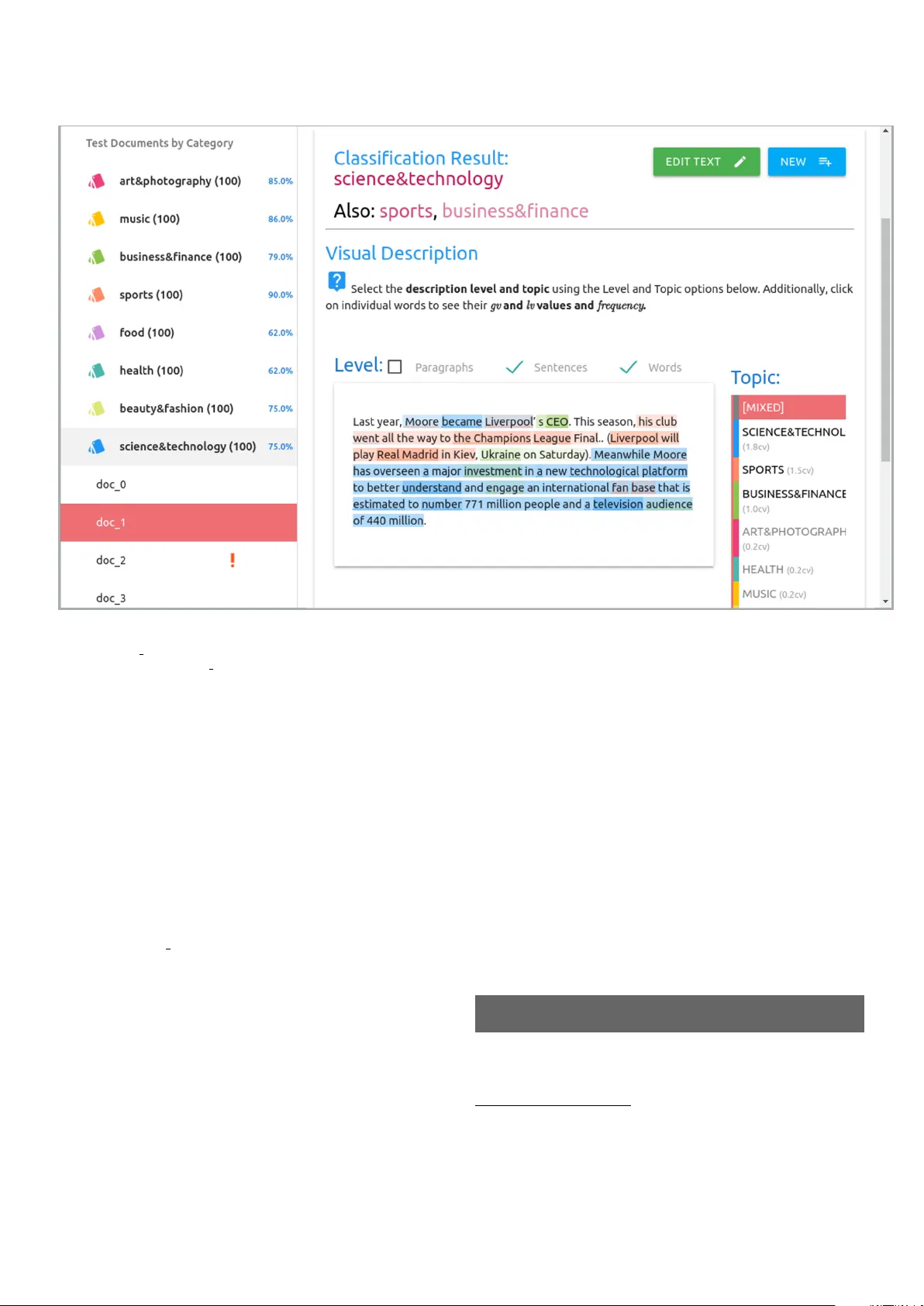
PySS3: A Python pac k age implemen ting a no v el text classifier with visualization to ols for Explainable AI Sergio G. Burdisso a,b, , Marcelo Errecalde a , Man uel Montes-y-G´ omez c a Universidad Nacional de San Luis (UNSL), Ej´ er cito de L os A ndes 950, San Luis, San Luis, C.P. 5700, Ar gentina b Consejo Nacional de Investigaciones Cient ´ ıfic as y T ´ ecnic as (CONICET), A r gentina c Instituto Nacional de Astr of ´ ısic a, ´ Optic a y Ele ctr´ onic a (INAOE), Luis Enrique Err o No. 1, Sta. Ma. T onantzintla, Puebla, C.P. 72840, Mexic o Abstract A recently introduced text classifier, called SS3, has obtained state-of-the-art p erformance on the CLEF’s eRisk tasks. SS3 w as created to deal with risk detection ov er text streams and, therefore, not only supp orts incremental training and classification but also can visually explain its rationale. Ho wev er, little attention has b een paid to the p oten tial use of SS3 as a general classifier. W e b eliev e this could be due to the unav ailability of an op en-source implementation of SS3. In this work, we introduce PySS3, a pack age that implemen ts SS3 and also comes with visualization to ols that allow researc hers to deploy robust, explainable, and trusty machine learning mo dels for text classification. Keywor ds: T ext classification, XAI, SS3 1. In tro duction A challenging scenario in the mac hine learning field is the one referred to as “early classification”. Early classifi- cation deals with the problem of classifying data streams as early as p ossible without ha ving a significan t loss in per- formance. The reasons b ehind this requirement of “earli- ness” could b e diverse, but the most imp ortan t and in- teresting case is when the classification delay has nega- tiv e or risky implications. This scenario, known as “early risk detection” (ERD), has gained increasing in terest in recen t y ears with p oten tial applications in rumor detec- tion [1, 2, 3], sexual predator detection, aggressive text iden tification [4], depression detection [5, 6], and terror- ism detection [7], among others. A recen tly introduced machine learning mo del for text classification [8], called SS3, has shown to b e well suited to deal with ERD problems on so cial media streams. It obtained state-of-the-art p erformance on early depression, anorexia and self-harm detection on the CLEF eRisk op en tasks [8, 9, 10]. Unlike standard classifiers, this new clas- sification mo del w as sp ecially designed to deal with ERD problems since: it can visually explain its rationale, and it naturally supports incremental training and classification o ver text streams. Moreo v er, SS3 in tro duces a classifica- tion model that does not require feature engineering and is robust to the Class Im balance Problem, which has b ecome one of the most c hallenging research problems [11]. Email addr esses: sburdisso@unsl.edu.ar (Sergio G. Burdisso), merreca@unsl.edu.ar (Marcelo Errecalde), mmontesg@inaoep.mx (Man uel Montes-y-G´ omez) Ho wev er, little atten tion has been paid to the p oten tial use of SS3 as a general classifier for do cument classifica- tion tasks. One of the main reasons could b e the fact that there is no open-source implemen tation of SS3 a v ailable y et. W e b eliev e that the av ailability of open-source im- plemen tations is of critical imp ortance to foster the use of new to ols, metho ds, and algorithms. On the other hand, Python is a p opular programming language in the ma- c hine learning communit y thanks to its simple syntax and a ric h ecosystem of efficient op en-source implementations of p opular algorithms. In this work, we introduce “PySS3” and share it with the communit y . PySS3 is an op en-source Python pac k age that implements SS3 and comes with tw o useful to ols that allo w working with it in an effortless, interactiv e, and vi- sual w a y . F or instance, one of these tools pro vides p ost-ho c explanations using visualizations that directly highligh t relev ant p ortions of the raw input do cumen t, allowing re- searc hers to b etter understand the mo dels b eing deploy ed b y them. Thus, PySS3 allo ws researchers and practition- ers to deplo y more robust, explainable, and trust y mac hine learning mo dels for text classification. 2. Bac kground In this section, we provide an ov erview of the SS3 clas- sifier. W e will introduce only the general idea and ba- sic terminology needed to understand the PySS3 pack age b etter. Readers in terested in the formal definition of the mo del are in vited to read Section 3 of the original paper[8]. Pr eprint July 21, 2020 2.1. The SS3 classific ation mo del As it is describ ed in more detail by Burdisso et al. [8], during training and for eac h given category , SS3 builds a dictionary to store word frequencies using all training do cumen ts of the category . This simple training metho d allo ws SS3 to supp ort online learning since when new train- ing do cumen ts are added, SS3 simply needs to update the dictionaries using only the conten t of these new do cu- men ts, making the training incremental. Then, using the w ord frequencies stored in the dictionaries, SS3 computes a v alue for eac h word using a function, g v ( w , c ), to v alue w ords in relation to categories. g v takes a word w and a category c and outputs a num ber in the interv al [0,1] rep- resen ting the degree of confidence with whic h w is believed to exclusively b elong to c , for instance, supp ose categories C = { f ood, music, heal th, sports } , we could hav e: g v ( apple, tech ) = 0 . 8; g v ( the, tech ) = 0; g v ( apple, business ) = 0 . 4; g v ( the, business ) = 0; g v ( apple, f ood ) = 0 . 75; g v ( the, f ood ) = 0; Additionally , a vectorial version of g v is defined as: − → g v ( w ) = ( g v ( w , c 0 ) , g v ( w, c 1 ) , . . . , g v ( w, c k )) where c i ∈ C (the set of all the categories). That is, − → g v is only applied to a word and it outputs a vector in which eac h comp onent is the word’s gv for each category c i . F or instance, follo wing the ab o ve example, we hav e: − → g v ( apple ) = (0 . 8 , 0 . 4 , 0 . 75) − → g v ( the ) = (0 , 0 , 0) The v ector − → g v ( w ) is called the “ c onfidenc e ve ctor of w ”. Note that each category is assigned to a fixed p osition in − → g v . F or instance, in the example abov e (0 . 8 , 0 . 4 , 0 . 75) is the c onfidenc e ve ctor of the word “apple” and the first p osition corresp onds to technol og y , the second to business , and so on. 2.1.1. Classific ation Pr o c ess The classification algorithm can be thought of as a 2- phase process. In the first phase, the input is split into m ultiple blo cks (e.g., paragraphs), then eac h blo c k is re- p eatedly divided in to smaller units (e.g., sen tences, words). Th us, the previously “flat” document is transformed in to a hierarc hy of blocks. In the second phase, the − → g v function is applied to eac h word to obtain a set of w ord c onfidenc e ve c- tors , whic h are then reduced to sen tence c onfidenc e ve ctors b y a word-lev el summary op er ator . This reduction pro- cess is recursiv ely propagated to higher-level blo c ks, using higher-lev el summary op er ators , 1 un til a single c onfidenc e 1 By default, in PySS3, the summary op er ators are vector addi- tions. Ho wev er, PySS3 provides an easy wa y for the user to de- fine his/her custom summary oper ators . More info on this can be found here: https://pyss3.rtfd.io/en/latest/user_guide/ ss3- classifier.html ve ctor , − → d , is generated for the whole input. Finally , the actual classification is p erformed b y applying some p olicy based on the c onfidenc e values stored in − → d —for instance, selecting the category with the highest c onfidenc e value in − → d . It is worth mentioning that it is quite straightforw ard to visually explain the classification pro cess if different in- put blocks are colored prop ortionally to their c onfidenc e v alues. As describ ed in section 3, this characteristic is ex- ploited b y the “Liv e T est” to ol to create in teractive visual explanations. 2.1.2. The Hyp erp ar ameters The entire classification pro cess dep ends on the g v func- tion since it is used to create the first set of c onfidenc e ve c- tors upon whic h higher-level c onfidenc e ve ctors are then created. As describ ed in more detail in the original pap er[8], the computation of g v inv olves three functions, l v , sg and sn , as follo ws: g v ( w, c ) = l v σ ( w , c ) · sg λ ( w , c ) · sn ρ ( w , c ) • lv σ ( w , c ) v alues a word based on the lo cal frequency of w in c . As part of this pro cess, the w ord distribu- tion curve is smo othed by a factor controlled b y the h yp erparameter σ . • sg λ ( w , c ) captures the significance of w in c . It is a sigmoid function that returns a v alue close to 1 when lv ( w , c ) is significantly greater than l v ( w, c i ), for most of the other categories c i ; and a v alue close to 0 when l v ( w, c i ) v alues are close to eac h other, for all c i . The λ hyperparameter controls ho w far lv ( w , c ) m ust deviate from the median to b e consid- ered significan t. • sn ρ ( w , c ) decreases the global v alue in relation to the num b er of categories w is significant to. That is, the more categories c i to whic h sg λ ( w , c i ) ≈ 1, the smaller the sn ρ ( w , c ) v alue. The ρ hyperparameter con trols how severe this sanction is. 3. PySS3 3.1. Softwar e ar chite ctur e PySS3 is comp osed of one main mo dule and three sub- mo dules. The main mo dule is called “p yss3” and con- tains the classifier’s implemen tation p er se in a class called “SS3”. The S S 3 class implements not only the “plain- v anilla” v ersion of the classifier [8] but also different v ari- an ts, suc h as the one introduced later by the same authors [9], which allo ws SS3 to recognize important w ord n-grams “on the fly”. Additionally , the S S 3 class exp oses a clear and simple API, similar to that of Scikit-learn mo dels, 2 2 F or instance, it has metho ds like “fit” for training and “pre- dict” for classifying. F ull list av ailable in the API do cumentation: https://p yss3.rtfd.io/en/latest/api/index.h tml#pyss3.SS3. 2 Figure 1: Live T est screenshot. On the left side, the list of test do cuments grouped by category is shown along with the p ercentage of success. Note the “do c 2” do cumen t is marked with an exclamation mark (!); this mark indicates it was misclassified, which eases error analysis. The user has selected the “do c 1”, the “classification result” is shown ab ov e the visual description. In this figure, the user has c hosen to display the visual explanation at sentence-and-w ord level, using mixed topics. F or instance, the user can confirm that, apparently , the mo del has learned to recognize imp ortan t words and that it has correctly classified the do cument. Also, b y using the colors, the user could notice that the first sentence b elonging to multiple topics, the second sentence shifted the topic to spor ts , and finally , from “Meanwhile” on, the topic is shifted to techlol ogy (and a little bit of business given by the words “inv estment” or “engage” colored in green). Note that the user can also edit the do cument or even create new ones using the tw o buttons on the upp er-righ t corner. as the reader will notice in the example sho wn in subsec- tion 4.1. Finally , this mo dule con tains the following three submo dules: • pyss3.server — con tains the server’s implemen ta- tions for the “Liv e T est” tool, describ ed in subsec- tion 3.3. An illustrativ e example of its use is shown in subsection 4.2. • pyss3.cmd line — implements the “PySS3 Command Line” to ol, describ ed in subsection 3.3. This sub- mo dule is not intended to b e imp orted and directly used with Python. • pyss3.util — this submo dule consists of a set of util- it y and help er functions and classes, such as classes for loading data from datasets or prepro cessing text. 3.2. Implementation platforms PySS3 w as dev elop ed using Python and was co ded to b e compatible with Python 2 and Python 3 as w ell as with differen t op erating s ystems, suc h as Lin ux, macOS, and Microsoft Windo ws. T o ensure this compatibility holds when the source co de is updated, we hav e configured and link ed the PySS3 Github repository with the T ravis CI service. This service automatically runs the PySS3’s test scripts using different operating systems and v ersions of Python whenev er new co de is pushed to the rep ository . 3 3.3. Softwar e functionality PySS3 is distributed via Python Pac k age Index (PyPI) and therefore can b e installed 4 simply b y using the pip command as follo ws: $ pip install pyss3 The pack age comes, in addition to the classifier, with t wo useful tools that allow w orking with SS3 in a v ery 3 T o monitor the compatibilit y state of the latest version of PySS3 online, visit https://travis- ci.org/sergioburdisso/pyss3 4 F or more details ab out installation, please refer to our on-line documentation: https://pyss3.rtfd.io/en/latest/user_guide/ installation.html 3 Figure 2: Ev aluation plot screenshot. Eac h data p oint represents an ev aluation/experiment performed using a particular combination of hyperparameter v alues. P oints are colored prop ortionally to the obtained p erformance. The p erformance me asure can be interactiv ely changed using the options panel in the upp er-left corner. Additionally , p oints with the global b est performance are marked in pink. As shown in this figure, when the user mov es the cursor ov er a p oin t, information related to that ev aluation is display ed, including a small version of the obtained confusion matrix. straigh tforward, in teractive, and visual wa y , namely the “Liv e T est” to ol and the “PySS3 Command Line” to ol. The “Liv e T est” tool is an interactiv e visualization to ol that allows users to test his/her mo dels “on the fly”. This to ol can b e launched with a single line of python code us- ing the S er v er class (see subsection 4.2 for an example). The to ol provides a user interface (a screenshot is shown in Figure 1) b y which the user can man ually and activ ely test the mo del being dev elop ed using either the do cumen ts in the test set or just typing in his/her o wn. Also, the to ol allo ws researc hers to analyze and understand what their mo dels are learning by providing an interactiv e and visual explanation of the classification pro cess at three differen t lev els (word n-grams, sen tences, and paragraphs). W e rec- ommend trying out some of the online liv e demos a v ailable at http://tworld.io/ss3 . 5 The “PySS3 Command Line” is an interactiv e command- line to ol. This tool allo ws users to deploy SS3 mo dels and 5 Like, for instance, the demos for T opic Categorization or Senti- ment Analysis on Movie Reviews. in teract with them through sp ecial commands for ev ery stage of the machine learning pip eline (such as mo del se- lection, training, or testing). Probably one of its most imp ortan t features is the abilit y to automatically (and per- manen tly) record the history of ev ery ev aluation that the user has p erformed (such as tests, k-fold cross-v alidations, or grid searches). 6 This to ol allows the user to visualize their models’ p erformance in terms of the v alues of the h y- p erparameters, as shown in subsection 4.3. This to ol can b e started from the op erating-system command prompt using the “pyss3” command, automatically added to the system when installing the pac k age. 4. Illustrativ e examples In this section, w e will introduce three simple illustra- tiv e examples. PySS3 pro vides t w o main types of work- flo w. In the classic workflo w, the user, as usual, imports the needed classes and functions from the pack age and then writes a python script to train and test the classifiers. In 6 These features are also av ailable through the py ss 3 .util.E v aluation class. 4 Figure 3: Evaluation plot - “show volume” option enabled. the “command-line” w orkflow, the whole machine learning pip eline is done using only the “PySS3 Command Line” to ol, without co ding in Python. Due to space limitations, w e will not sho w examples for the latter here. Ho wev er, for full working examples using b oth workflo ws, please re- fer to the tutorials in the documentation ( https://pyss3. rtfd.io/en/latest/user_guide/getting- started.html# tutorials ). 7 In the following examples, we will assume the user has already loaded the training and test do cumen ts and cate- gory labels, as usual, in the x tr ain , y tr ain , x test , y test lists, resp ectiv ely . F or instance, this could b e done using the D ataset class from the py ss 3 .util submo dule, as fol- lo ws: from pyss3.util import Dataset x_train,y_train = Dataset . load_from_files( "path/to/train" ) x_test, y_test = Dataset . load_from_files( "path/to/test" ) 4.1. T r aining and test This simple example shows how to train and test an SS3 mo del using default v alues. 7 Readers interested in trying PySS3 out right awa y , we hav e cre- ated Jup yter Noteb ooks for the tutorials, which can b e used to in ter- act with PySS3 in an online live environmen t ( https://mybinder. org/v2/gh/sergioburdisso/pyss3/master?filepath=examples ). from pyss3 import SS3 clf = SS3() clf . fit(x_train, y_train) y_pred = clf . predict(x_test) print ( "Accuracy:" , accuracy(y_pred, y_test)) The last line prin ts the obtained accuracy , we are as- suming here that this accur acy function already exists. 8 Note that since SS3 creates a language mo del for eac h cat- egory , we do not need to create a document-term matrix, w e are simply using the ra w x tr ain and x test do cuments for training and test, resp ectiv ely . 4.2. T r aining and (live) test This example is similar to the previous one. Ho wev er, instead of simply using pr edict and accur acy to measure our mo del’s p erformance, here we are using the “Liv e T est” to ol to analyze and test our mo del visually . from pyss3 import SS3 from pyss3.server import Live_Test clf = SS3() clf . fit(x_train, y_train) Live_Test . run(clf, x_test, y_test) 4.3. Hyp erp ar ameter optimization This example sho ws how we could use the “Ev aluation” class to find b etter hyperparameter v alues for the model trained in the previous example. Namely , we will p er- form hyperparameter optimization using the grid se ar ch metho d, as follows: from pyss3.util import Evaluation best_s, best_l, best_p, _ = Evaluation . grid_search( clf, x_test, y_test, s = [ 0.2 , 0.32 , 0.44 , 0.56 , 0.68 , 0.8 ], l = [ 0.1 , 0.48 , 0.86 , 1.24 , 1.62 , 2 ], p = [ 0.5 , 0.8 , 1.1 , 1.4 , 1.7 , 2 ] ) Note that in PySS3, the σ , λ , and ρ hyperparameters are referenced using the “s”, “l”, and “p” letters, resp ec- tiv ely . Th us, in this grid search, σ will take six different 8 F or instance, it was previously imported from sk learn.metr ics . 5 v alues betw een .2 and .8, λ b et ween .1 and 2, and ρ b e- t ween .5 and 2. Once the grid search is ov er, the b est h yp erparameter v alues will b e stored in those three v ari- ables. W e can also use the “plot” function to visualize our results: Evaluation . plot() This function will first sa ve, in the current directory , a single and p ortable HTML file containing an interactiv e 3D plot. Then, it will op en it up in the web bro wser; a screenshot is shown in Figure 2, 9 in whic h w e can see that the b est hyperparameter v alues are σ = 0 . 32, λ = 1 . 24, and ρ = 1 . 1. Finally , we will update the hyper- parameter v alues of our already trained mo del using the “set h yp erparameters()” function, as follows: clf . set_hyperparameters(s = best_s, l = best_l, p = best_p) Alternativ ely , we could also create and train a new mo del using the obtained b est v alues: clf = SS3(s =0.32 , l =1.24 , p =1.1 ) clf . fit(x_train, y_train) Note that, in addition to using the 3D ev aluation plot to obtain the b est v alues, users can use it to analyze (and b etter understand) the relationship b etw een hyperparam- eters and p erformance in the particular problem b eing ad- dressed. F or instance, if the “show volume” option is en- abled from the options panel, the plot will turn in to the plot shown in Figure 3. Using this plot, now, one can see that the sanction ( ρ ) h yperparameter does not seem to im- pact p erformance. In contrast, the p erformance seems to increase as the signific anc e ( λ ) v alue increases and seems to drop as the smo othness ( σ ) h yperparameter mo v es a wa y from 0 . 35. 10 5. Conclusions W e ha ve briefly presented PySS3, an op en-source Python pac k age that implements SS3 and comes with useful de- v elopment and visualization to ols. This softw are could b e useful for researc hers and practitioners who need to de- plo y explainable and trust y mac hine learning mo dels for text classification. 9 More info av ailable in the documentation ( https: //pyss3.rtfd.io/en/latest/user_guide/visualizations.html# evaluation- plot ). 10 It is w orth mentioning that researc hers could share these 3D model ev aluation’s p ortable files in their papers, which would in- crease exp erimentation transparency . F or instance, we hav e up- loaded the file used for the ev aluation sho wn in Figure 2 for readers to interact with it: https://pyss3.rtfd.io/en/latest/_static/eval_ plot.html Nr. (executable) Soft ware metadata description S1 Curren t softw are version v0.6.2 S2 P ermanent link to exe- cutables of this version https://pypi.org/ project/pyss3/0.6.2/ S3 Legal Softw are License MIT License S4 Computing plat- form/Op erating System Lin ux, OS X, and Microsoft Windo ws S5 Installation requirements & dep endencies Pip, Python 2.7-3.x, Scikit- learn 0.20 or higher, Mat- plotlib S6 Link to do cumen tation https://pyss3.rtfd.io S7 Supp ort email for ques- tions sergio.burdisso@gmail. com T able A.1: Softw are metadata Nr. Code metadata de- scription C1 Curren t co de version v0.6.2 C2 P ermanent link to co de/repository used of this co de version https://github.com/ sergioburdisso/pyss3 C3 Legal Co de License MIT License C4 Co de v ersioning system used git C5 Soft ware co de languages, to ols, and services used Python, Jav ascript, HTML C6 Compilation require- men ts, op erating en vi- ronmen ts & dep endencies Python 2.7-3.x, Scikit-learn 0.20 or higher, Matplotlib C7 Link to dev eloper do cu- men tation/manual https://pyss3.rtfd.io/ en/latest/api C8 Supp ort email for ques- tions sergio.burdisso@gmail. com T able A.2: Code metadata App endix A. Required metadata App endix A.1. Curr ent exe cutable softwar e version T able A.1 giv es the information ab out the softw are re- lease. App endix A.2. Curr ent c o de version T able A.2 describ es the metadata ab out the source co de of PySS3. [1] J. Ma, W. Gao, Z. W ei, Y. Lu, K.-F. W ong, Detect rumors using time series of so cial con text information on microblogging websites, in: Pro ceedings of the 24th A CM International on Conference on Information and Kno wledge Managemen t, ACM, 2015, pp. 1751–1754. [2] J. Ma, W. Gao, P . Mitra, S. Kw on, B. J. Jansen, K.-F. W ong, M. Cha, Detecting rumors from microblogs with recurrent neu- ral netw orks., in: IJCAI, 2016, pp. 3818–3824. [3] S. Kwon, M. Cha, K. Jung, Rumor detection ov er varying time windows, PloS one 12 (1) (2017) e0168344. [4] H. J. Escalante, E. Villatoro-T ello, S. E. Garza, A. P . L´ op ez- Monroy , M. Montes-y G´ omez, L. Villase ˜ nor-Pineda, Early de- tection of deception and aggressiveness using profile-based rep- resentations, Exp ert Systems with Applications 89 (2017) 99– 111. 6 [5] D. E. Losada, F. Crestani, J. Parapar, erisk 2017: Clef lab on early risk prediction on the in ternet: Exp erimental foundations, in: International Conference of the Cross-Language Ev aluation F orum for Europ ean Languages, Springer, 2017, pp. 346–360. [6] D. E. Losada, F. Crestani, A test collection for research on depression and language use, in: International Conference of the Cross-Language Ev aluation F orum for Europ ean Languages, Springer, 2016, pp. 28–39. [7] B. S. Isk andar, T errorism detection based on sentimen t analy- sis using machine learning, Journal of Engineering and Applied Sciences 12 (3) (2017) 691–698. [8] S. G. Burdisso, M. Errecalde, M. M. y G´ omez, A text classifica- tion framework for simple and effective early depression detec- tion over social media streams, Expert Systems with Applica- tions 133 (2019) 182 – 197. doi:10.1016/j.eswa.2019.05.023 . URL http://www.sciencedirect.com/science/article/pii/ S0957417419303525 [9] S. G. Burdisso, M. Errecalde, M. M. y G´ omez, t-SS3: a text classifier with dynamic n-grams for early risk detection ov er text streams, Pattern Recognition Letters (In Press, Journal Pre-proof ). doi:10.1016/j.patrec.2020.07.001 . [10] S. G. Burdisso, M. Errecalde, M. M. y G´ omez, UNSL at erisk 2019: a unified approach for anorexia, self-harm and depression detection in so cial media, in: Exp erimen tal IR Meets Multi- linguality , Multimo dality , and In teraction. 10th In ternational Conference of the CLEF Association, CLEF 2019, Springer In- ternational Publishing, Lugano, Switzerland, 2019. [11] C. Zhang, J. Bi, S. Xu, E. Ramentol, G. F an, B. Qiao, H. F u- jita, Multi-imbalance: An op en-source softw are for multi-class imbalance learning, Knowledge-Based Systems 174 (2019) 137– 143. 7
Original Paper
Loading high-quality paper...
Comments & Academic Discussion
Loading comments...
Leave a Comment