Asynchronous Wi-Fi Control Interface (AWCI) Using Socket IO Technology
The Internet of Things (IoT) is a system of interrelated computing devices to the Internet that are provided with unique identifiers which has the ability to transfer data over a network without requiring human-to- human or human-to- computer interac…
Authors: Devipriya T K, Jovita Franci A, Deepa R
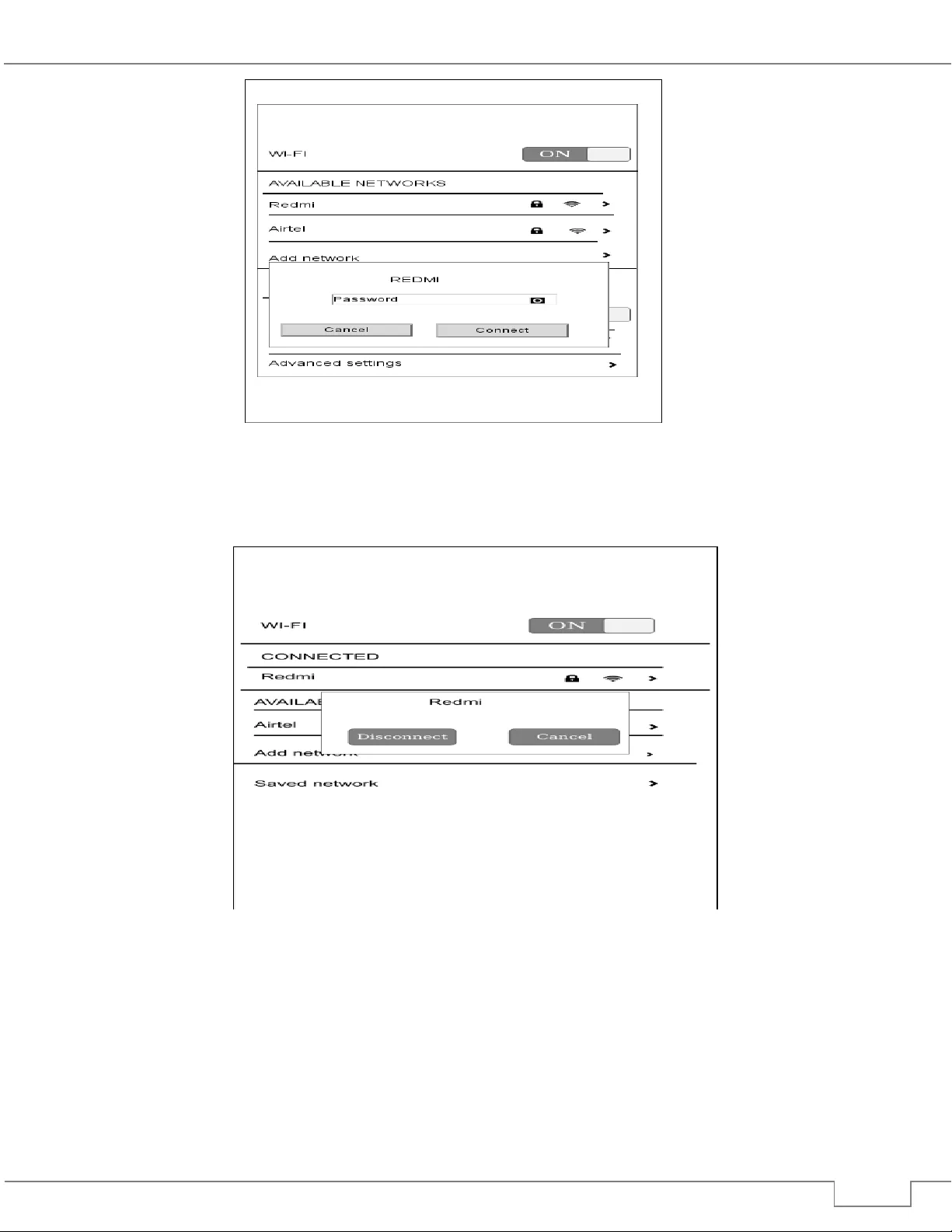
GRD Journals | Global Research and Development Journal for Engineering | National Conference on Computational Intelli gence Systems ( NCCIS’17) | March 2017 e-ISSN: 245 5-5703 All rights reserved b y www.grd journals.com 66 Asynchronous Wi-Fi Control Interface (AWCI) Using Socket IO Technology 1 Devipriya.T.K 2 Jovita F ranci.A 3 Dr R Deepa 4 Godwin Sam Josh 1 ,2 Student 3 Professor 4 Technical Director 1,2 ,3 Department of Information Tec hnolog y 1 ,2,3 L o y ola-ICAM College of Engineering and Technolog y Chennai, India 4 GloriaTech Chennai, India Abstract The Internet of Things (Io T) is a system of interrelated co mputing devices to the Internet that are provided with unique identifiers which has the ability to tr ansfer data o ver a net work with out requiri ng hu man - to - human or human - to - computer interac tion. Raspberry p i-3 a po pular, cheap, small and p owerful co mputer with built in Wi -Fi can be used to make any devices smart b y connecting to that particular device and em bedding the required software to Raspberry pi -3 and connect it to Internet. It is difficult to install a full Linux OS inside a s mall devices like light switch so in that case to connect to a Wi -Fi connection a model was proposed known as Asynchronous Wi -Fi Contro l I nterface (AWCI) which is a si mple Wi -Fi co nnectivity software for a Deb ian compatible Linux OS). T he objec tive o f this pap er is to ma ke t he interactive user inter face for Wi -Fi connection in Raspberr y Pi touch di splay b y providing live updates using So cket IO technology. The Soc ket IO tec hnology e nables real -time bidirec tional communication betwee n clie nt and server. Asynchronous Wi -Fi Control Inter face (AWCI) is co mpatible with eve ry platform, browser or device . Keyword- Internet of Things, Web soc ket, Socket IO, As ynchronous Wi -Fi, Debia n, Node. js, Raspberry Pi 3 ____________ _____________________ __________________ _______________________ ________________ ________ I. I NTRODUCTION Internet of Things is th e vast network of devices connected to the Internet, including smart phones and tablets and almost anything with a sensor o n it and it i ncludes ca rs, machines in pr oduction plan ts, jet engines, oil drills, wearable device s, a nd more. T hes e “things” connected to the Internet called “Interne t of Things” (I oT) and it collects and exc hange data. IoT is about m aking the data to come together in new ways for a busin ess domain. The edge of the IoT is wh ere the action is and it includes everyday physical objects that are becoming equipped with a wide array of sensors, actuators, and devices which are being ( uniquely) addressa ble and interconnected, those s ystem e nd -points t hat i nteract with and co mmunicate real -time data from smart products and ser vices. Technologies such as wirel ess se nsor network s, short -range wireless co mmunications, an d r adio - frequency identificatio n (RFID) have allowed the Internet to penetrate in e mbedded co mputing. As IoT is gro wing fast, International Data Corpor ation (IDC) made a survey and found that b y 2020 more than 28 billion things will be co nnected to the Internet from smart watc hes and other wearable’s to smart cities, s mart homes, and smart cars [1]. Raspberry pi-3 is small sized co mputer with Quad -core, 64-bit A RM a nd in-built W iFi m o dule can b e used i n IoT projects to for establishing communication between the devices and to make them as “smart” devices [2], [3]. Raspberry pi can be attac hed to a small to uch screen tab lets availab le in the market to make it use in I oT p rojects. Most of the Raspberry pi is installed with Raspbian OS (Debian compatible Linux OS) and it is configured according to the project in which it is going to be used and wh e n it is switched on, it opens directly with the specified configured softw are. In this case to conn ect to network connection Raspb erry pi needs a Wi-Fi module which is pro posed in this paper [4 ] . Fig. 1: Raspberry pi-3 with touch screen Asynchronous W i-Fi Control Int erface (AWCI) Usi ng Socket IO Te chnolog y (GRDJE / CONFER ENCE / NC CIS ’ 17 / 011) 67 All rights reserved b y www.grd journals.com Asynchronous Wi-Fi Control Interface (AWCI) scans the available Wi -Fi network continuously and updates the changes automatically by usin g Socke t IO tech nology which makes use of W eb socket pro tocol and this makes the syste m more live. Socke t IO helps in developing a real time w eb application and i t is a JavaScript libr ary that enables real ti me, bidirectional communication between w eb clients and servers. The server side is develo ped u sing Node.js wh ich is an event -driven architecture with a capability to support asynchronous I/O. In Web applications these d esign choices aim to op timize throughpu t and scalab ility with many input/output operations, a s well as for real -time W eb applicatio ns [6]. II. A SYNCHRONOUS W I -F I C ONTROL I NTERFACE AWCI is a touch screen optimized app to connect Raspberry -pi 3 to a wireless network. Devices that configure Raspbian O S for a special purp ose and directl y opens up with the specified software needs AWCI so ftware c omponent to co nnect wireless network. AWCI app will be more comfortable for an y user to operate the device a nd easily make it co nnect to internet. III. S YSTEM ARCHITE CTURE User who needs to work on IoT projects w ith the help of Raspberry pi-3 and want their Raspberry pi-3 with a touch screen display wants to be connected to the wireless n etwork can m ake u se of AWCI software ( touch screen optimized app) to connect to wirele ss network provided by a Wi - Fi Router by s canning available networks and by connecting to it when needed and disconnecting from the wireless net work. Fig. 2: System Architecture of AW CI A. Server Design Using No de.Js For develo ping a d iverse variet y of server tools and applicatio ns, Node .js which is an op en-source, cross-platfor m JavaScript runtime environ ment can be used. In A WCI th e Server side application is bu ild using Node.js Alth ough Node.js is not a JavaScr ipt framework, many of it s b asic modules are written in JavaScr ipt, which he lps o ne to easi ly use t his Node.j s in developing their server application. Node. js applicatio ns ca n run on macOS, Micro soft W indows, and U nix servers (ie) it supports cro ss platfor m and so AWCI i s a cross platfor m so ftware. No de.js has an event -driven arc hitecture capable of as ynchronous I/O makes it has a choice to d esign Web ap plications with many i nput/output operations, as well as for real -time Web app lications [5]. In AWCI Node.js w as c hosen as Server side as it suppo rts as ynchronous I/O which helps o n e to scan av ailable networks continuously without refreshing the net works availa ble page each time when a new network is available. No de.js have a collectio n of " modules" that handle various core functio nality and these modules use an API d esigned to reduc e the complexit y of writing server app lications. Express is a flexible Node.js web application framework that provides a robust set of features to develop web and m obile applications. It facilitates the rapid development of Node based Web applications. It allo ws in setting up middleware to respond to HTTP Req uests, defines a routing table which is used to perform different ac tions based on HTTP Method and URL, allows to dynamically rendering HT ML Pages based on passing arguments to te mplates [7]. Socket I O librar y included in the No de.js helps to develop a real ti me bidirectional e vent -based co mmunication. I nitial step is setting up Node.js server and router, an d t hen co nnecting s ocket.io to thi s server. After that sending data to the cl ien t throu gh the socket connectio n and sending data to the ser ver through the socket connection. A Node.j s module pr oviding methods for scanning local WiFi ac cess points, as well as connecti ng/disconnecting to networks and it works for W indows, Lin ux and Ma cOS. Among many ava i lable np m p ackages for WiFi connectivit y “wireless - Asynchronous W i-Fi Control Int erface (AWCI) Usi ng Socket IO Te chnolog y (GRDJE / CONFER ENCE / NC CIS ’ 17 / 011) 68 All rights reserved b y www.grd journals.com tools” is chosen in this paper as it is o ne a mong t he o ther packages suppo rted by Ra spberry pi - 3. T his “ wireless - tools” p ackage supports “iwlist” which is command t hat is used to get d etailed inf ormation fro m a wireless i nterface. It provides both synchronous and asynchronous methods. Along w ith “wireless - tools” another d ependenc y “pi - wifi” is add ed to provide secure network connection via wpa -supplicant co mmands [8]. B. Client Design Using Bo otstrap Bootstrap is a free and open-source front-end web framework f or designing websites and web applications. It contains HTML and CSS based design templates for typography, for ms, buttons, navigation and o ther interface components, as w ell as optio nal JavaScript exte nsions. B ootstr ap is compatible with the Go ogle Chro me, Fire fox, Internet Explorer , Oper a, and Safari bro wsers, although some of these b rowsers ar e not supported o n all platforms and this feat ure makes AWCI multi -platform soft ware. It also supports responsi ve web des ign which means the layout o f web pages ad justs d ynamically, taking into ac count the c haracteristics of th e device used (desktop, tablet, m obile phone) and this makes A WCI to dyn amically adjust to the size of touch screen to which Raspberry pi- 3 is connected [ 9],[10]. C. Implementation of AWCI To c onnect to Internet, all the modules in AWCI are developed in such a w ay it is ver y similar to Andro id m obile Wi -Fi connection. Now a d ays since Andro id mobile phones are used by most of the users and it pro vide a very user friendly user interface similar user interface is used in AWCI. 1) Scan Available Network Module This module scans a vailable network and it displa y the available network with its stren gth and sec urity when it i s secured b y a password. It displa ys t he SSI D (Service Set IDe ntifier) of t he ava ilable net works. S SID is the name assi gned to W i -Fi net work. All d evices i n the network must use this S SID (case - sensitive name) to communicate over Wi -Fi, which is a text stri ng up to 32 bytes long. Wireless routers and access points hav e a def ault SSID, which may b e the m anufacturer's name. Some d evices use thei r model number as the SSID. Using a Web browser, the SSID ca n b e manually chan ged in t he device's configuration settings. W i - Fi routers nor mally br oadcast their SSID and this helps AW CI to scan the broad cast SSID [11]. “Wireless - tools” asy nchronous method “i wlist.scan ( 'wlan0', function (er r, net works)” is used to scan the availab le net work and ret urn the scan results con tinuously with the help of cal l-back functio n. Fig. 3: Scans and display SSID of available network 2) Connect to Network Module To connect to t he available scanned net work one can clic k to the par ticular SSID. I f it is secure it will displa y a modal dia log box to enter the pass word and it will validate the p assword and if it i s valid it allo ws one to connect to a wireless net work else if it not valid it display a “ Password Incorrect” m essage o nly authe nticated user can be ab le to connect to wireless network in case pa ssword is provided . If it is not secured with a password it will co nnect directl y to that particular SSID and one will be connected to a wireless network. Once it is connected it displays “Connected” message indicating that connection is established. “wireless - tools” asyn chronous meth od “w pa_supplicant.e nable(options, fun ction(err) ” is used to connect to the scanned network and this u se a call - back to repor t continuous updates like authenticati ng, connecting, and so on. Asynchronous W i-Fi Control Int erface (AWCI) Usi ng Socket IO Te chnolog y (GRDJE / CONFER ENCE / NC CIS ’ 17 / 011) 69 All rights reserved b y www.grd journals.com Fig. 4: Provide password for a particular SSID (REDMI) to connect to network 3) Disconnec t From Network Mo dule To disconnect from the connected wireless n etwork one should again click the connected SSID which have a “ Disconnect” button clicking t hat one can disconnect from the wireles s network connection. “wi reless - tools” asynchronous method “wpa_supplicant.disable( 'wlan0', function(err)” is used to disco nnect from t he connected network and so metimes po wering do wn and back up can take a while, depending on user ’s wireless card , so this method will retur n callb ack when it is co mplete. Fig. 5: Click disconnect button to disconnect from wireless network IV. C ONCLUSION AND F UTURE E NHANCEMENT In this p aper, a simple Wi -Fi c onnectivity soft ware As ynchronous W i- Fi Contro l Interface (AWCI) was developed for Raspberry pi -3 which ha s in b uilt Wi -Fi and it can be used in Inter net of T hings (IoT ) projects to connect to Internet and make their devices “smart” with the help of Raspberry pi -3 with a touc h screen optimized. Further enhancement can be done by developi ng a nother Socket IO client wh o can view the available n etworks of anot her client remotely a nd connect to the available networks remotely usin g Socket IO technolog y since it has the capabilit y to esta b lish connection even in the case of p ersonal fire wall and antivir us software which p revents external device in enterin g the internal private network. This can be useful in case an orga nization develo ps a Wi -Fi connectio n for its clie nt but t he clie nt found some issues in connecting to ava ilable networks [12 ]. Asynchronous W i-Fi Control Int erface (AWCI) Usi ng Socket IO Te chnolog y (GRDJE / CONFER ENCE / NC CIS ’ 17 / 011) 70 All rights reserved b y www.grd journals.com R EFERENCES [1] LaPlante, Alice. "Anal yzing Data in the I nternet of Things". O'Reilly Media. N. p., 2017. Web . 17 Feb. 2017. [2] Davoli, Luca et al. " Integration of Wi -Fi Mobile Nodes in a Web of Things Testbed". ICT Express 2.3 (2 016): 96 -99. Web. [3] Bermúdez-Ortega, J . et al. " Remote Web-Based Control Laborator y for Mo bile Device s Based On Ejss, Raspberr y Pi and Node.Js**This Work Has B een Supported By the Spa nish Natio nal Research P roject DPI2013 -46665 - C2 -1-R.". IFAC- PapersOnLine 48.2 9 (2015): 158 -163. Web . [4] Lewis, A.J., M. Campbell, and P . Stavroulakis. " Performance Evaluation of a Cheap, Op en Source, Di gital E nvironme ntal Monitor Based On the Raspberry Pi" . Measurement 87 (2 016): 228 -235 . Web. [5] "Socket.IO". So cket.io. N.p., 201 7. Web. 9 Feb. 2017. [6] "Node.Js". E n.wikipedia.org. N .p., 2017 . Web. 10 Feb. 2017. [7] "Express". npm. N.p., 2017. Web. 18 Feb . 2017. [8] "Wireless-tools" . npm. N.p., 2017 . Web. 18 Feb. 2017. [9] "Bootstrap 3 Tutorial". W3schools.co m. N.p., 2017. Web . 18 Feb. 2017. [10] Mark Otto, and Boo tstrap contributors. " Getting Started • Boo tstrap". Getboo tstrap.com. N.p., 2017 . Web. 18 Feb. 2017. [11] "SSID Definition fro m PC Magazine Enc yclopedia" . Pcmag.com. N.p., 2017 . Web. 18 Feb. 2017. [12] "Github - Socket io/Socket.Io: Realtime Applicatio n Framework (Node.J S Server)" . Github.com. N.p., 2017 . Web. 18 Feb. 2017.
Original Paper
Loading high-quality paper...
Comments & Academic Discussion
Loading comments...
Leave a Comment