Risk Assessment For Spreadsheet Developments: Choosing Which Models to Audit
Errors in spreadsheet applications and models are alarmingly common (some authorities, with justification cite spreadsheets containing errors as the norm rather than the exception). Faced with this body of evidence, the auditor can be faced with a hu…
Authors: ** Raymond J. Butler, CISA (HM Customs & Excise, UK) **
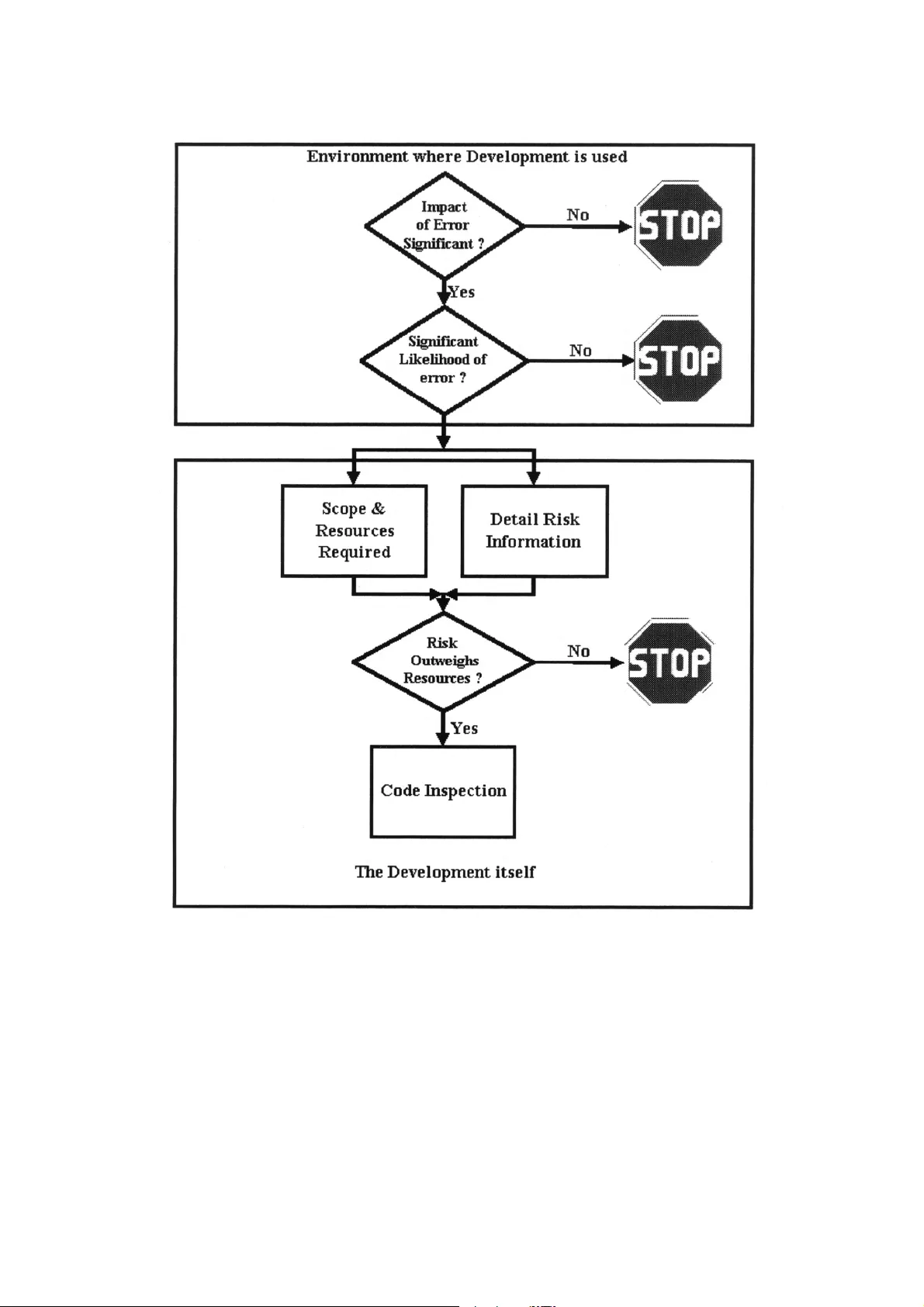
- 1 - Risk Asses sment Fo r Sprea dsheet Developm ents: Choo sing Whi ch Mode ls to Audit Raymond J. Butler, CISA H. M. Customs and Ex cise, UK Email ray.butler@hmce.gov.uk © Crown Cop yright reserved, published by per mission of th e Co mmissioners of H M Customs & Excise ABSTRACT Errors in spreadsheet applications and models are alarmingly common (some authorities, wi th justification cite spreadsheets containing errors as the norm rat her than the exception). Faced with this body of evidence, the auditor can be faced wit h a huge task - the temptation may be to launch code inspections for every spreadsheet in a n organisation. T his can be very expensive and time-consuming. This paper describes risk assessment based on t he "SpACE" audit methodology used by H M Customs & Excise's tax inspectors. This allow s the auditor to target resources on the spreadsheets posing the highest risk of error, and jus tify the deployment of those resources to managers and clients. Since the opposite of audit risk is audit assurance the paper also offers an overview of some elements of good practice in the use of spreadsheets in bu siness. 1. INTRODUCTION There is a huge bod y of evidence ( summarised in P anko, 2000 1 and Creely, 2000 2 ) that errors in spreadsheet applications and models are alarmin gly common (some authorit ies, with justification cite spreadsheets containing errors as the norm r ather than the exception) Spreadsheet users, developers, and auditors need t o define controls in order to manage and reduce this risk. Preventive Controls Sound development methods, standards and user ed ucation are the obvious preventive controls, These have been described for almost as long as electronic spreadsheets have been available (e.g. Nevison, 1987 3 and Batson & Eyles, 1995 4 ) The many examples of errors found in both field audit s and experiments (Panko, 2000 1 , Butler, 2000 5 ) and studies such as that of Galletta & Huffla gel, 1992 6 show that: • good development practice is rarel y codified into business procedures, and • Even when it is, the rules and restrictions it requires are not follow ed to any significant degree. Detective and Corrective Control Detective and corrective controls over spreadsheet errors are principall y provided by detailed code inspection to check the formulas and where necessar y the input data. This can be - 2 - • an entirely manual process, or • One of the several computer-assisted audit tools f or spreadsheets may be used. Code inspection may be performed b y • one individual (not particularl y effective - Galletta, Abraham, Louadi, Lekse, Poll ailis and Sampler, 1993 7 found it to be less than satisfactory, detectin g only around 50% of errors) • by teams of 2 or more (More effective, findin g around 80% of errors - Panko, 1996 8 ). The Auditor's Problem Faced with this body of evidence, the audito r can be faced with a huge task – the temptati on may be to perform a full code inspection on ever y spreadsheet encountered. However, effective code inspection, even when aided b y Computer-assisted audit tools, can be extremel y resource intensive. Given limited resources, even with the anecdotal evidence of th e inevitabilit y of errors in spreadsheet model development, audito rs must prioritise their work and justi fy the expense of code inspection to management and clients have to determine • the potential impact of errors in a model on the organisation and • The likely incidence of errors in the model. This paper describes a risk assessment methodology used (with som e success) by officers of H M Customs & Excise to determine which spreadsheet applications they need to test in depth in order to gain assurance that they calculate taxes and duti es correctly. A note on Terminology The terminology used in this paper reflects the fact that Microsoft Excel is the spreadsheet programme used by H M Customs & Ex cise. However, the concepts and methods set out below apply to any electronic spreadsheet pro gramme and (with minor modifications) to ot her areas of end-user computing. In this paper • spreadsheet is used to mean the electronic spread sheet program (e.g. Microsoft Excel, Lotus 1-2-3) used to develop a • model - a generally complex single use development for financial or other planning purposes or an • Application, which ma y be simple or complex but is generall y use d as a regular part of a business' operation. 2. THE RISK ASSESSMENT The methodology described is a multi -stage process, which allows the auditor to make a “stop / go" decision at each stage Figure 1 ill ustrates this. The first two stages of Risk Ass essment considers the environment wit hin which the model or application is developed. The subsequ ent steps move on to consider the development itself. - 3 - Figure 1 - Overview of Risk Assessment Meth odology 2.1 OVERALL RISK ASSESSMENT All audit planning is governed by the need to deplo y resources to address quantified risks. The auditor must therefore determine both the impact a nd possible incidence of risks before setting out on a testing programme. The first two stages of risk assessment - the overall assessment - are performed without l ooking at the detail of the model or application at all. All the steps, and the evaluati on, ma y be taken relatively quickl y, a nd the tim e saved by avoiding unnecessar y code inspections amply justifies the effort of risk assessment. - 4 - Impact of Errors The auditor must determine the: • amount of money or other resources handled b y or at risk from the application or model • regulatory consequences of an y errors • impact of any errors on the organisation 's public image, shareholder etc. confidence The span of this will cover either the current ins tance or (if the current instance is a template for future re-use) a year or some other convenient period . The re - use of an application as a template for business operations will mul tiply both the reso urces handled and the impact of an y errors. At this point the auditor can decide wheth er the amount at risk from the application jus tifies the work required to ascertain the likel y incidence of errors. Likely Incidence of Errors When the Auditor has that the impact of an error is li kely to be significant, the auditor must make a judgement as to the likelihood of that expos ure occurring. To inform this judgement, the auditor must consider the answers to t he following questions: Organisation Qu estions Does the organisation for whom the development i s being made have an adequate polic y governing development, testing and use of spread sheet models and applicati ons? What evidence is there that this poli cy is observed and enforced? Domain Questions How complex are the business or revenue issues th at the model or application purports t o address? Is there evidence that the developer of the model or application has • An adequate understanding of those issues? • Access to a clear, accurate, written explanation of the business issues? If domain knowledge is partial or absent, errors in the base calculations or of omission are much more likely. Further, it foll ows that the developer will be less able to detect errors through a “reasonableness test” of the output from a model o r application. Specification Questions • Is there a clear statement of the inputs, processes, out puts and results required for the • model or application? • Is it complete and accurate? • Has the user agreed it? - 5 - • Does it include agreed measures of the success of the development? • Does it include a testing plan? If no specification exists, then domain and arithmeti cal errors are much more likel y, and there will be no control against which the completen ess and accuracy of the results can be jud ged. Developing a complex spreadsheet application or mo del without a specification is akin to walking across a swamp without a map - the onl y measure of success is surviving the experience. Testing Questions What evidence is there that the application was thoroughl y tested before being brought into use? And thoroughly tested again each time a material change was made? I f a model or application can be shown to have given • sensible answers when te sted with simple numbers (for example, if the answer to =+5+5 is 7 then there's a problem somewhere) and • the results predicted whe n realistic test data are processed and • the results predicted whe n running the model in parallel with previous s ystems Then there is a good level of assurance that the inci dence of errors will be low. Documentation Questions Has the developer documented the application ade quately ? Good documentation should m ake clear statements of: • the application's purpose, what it does and how it does it • any assumptions made in its design • what standing data constants (e.g. tax, dut y, interest and exchange rates) are used and where they are held • who developed it and when, and • When and how it has been changed since bein g brought into use. • How the application or model should be used. The absence of documentation has been a factor i n a number of well-documented spreadsheet errors. Where a developer is not the end-user of an appli cation, where any application is more than utterly simple, and wherever the developer will not be maintaining and updating the application documentation is absol utely essential. Failure to document the inner workings of a model simpl y stores up troub le for whoever has to amend or maintain it. Failure to document it s correct operation by the end-users can lead to serious errors, especially in an environment where a model or application is passed from user to us er. Questions abou t the complexity of the application - 6 - How complicated is the application? Is it laid out logically, with data and calculations in separate areas, and with complex calculations broken dow n into stages? Is the ar ithm etic of the calculations clear from the visible information, allowing it to be ch ecked manually for accurac y and completeness? Data Control Questions In common with all computer applications, the ac curacy of the results of processing depend on the completeness, accuracy, timeliness and author isation/appropriateness of the data. Even when a properly validated specification has been verified as implemented correct ly, with all domain and arithmetic issues correctl y handled, the GIGO (for younger readers, Garbage in, Garbage Out) principle still applies. The auditor must therefore ask what controls are b uilt into the application to ensure that: • all relevant data are input, • no irrelevant or inappropriate data are input • data are input accurately, and • data are input for process at the correct time Evaluation The auditor must consider the answers to these qu estions to inform a decision whether or not it is worth proceeding to the nex t stage. It is important that the quality of documentation, test plans, etc is taken into account in this decision - good practi ce in these areas is very rare, and auditors must beware of being led to a false sense of securi ty by the ver y e xistence of documentation, user instructions, etc. Given that • the amount of resource potentiall y at risk, and • the evaluation of the above factors Shows that the impact and likelihood of errors justi fies further work, the auditor can progress to the next stage of risk assessment. This stage determines whether a full cod e inspection ma y be required, how much effort ma y be involved in it, and whether the effort will be justified b y the risk. 2.2 RISK IDENTIFICATIO N & SCOPING Given that the impact and likelihood o f error justify further work, the auditor now needs to establish • the size and complexit y of the application (to help plan the time needed to test it), • Which parts of it pose the highest risk (to help dir ect the tests to those risk areas). - 7 - This step requires access to the model or application , since its composition and set-up have to be assessed in order to inform the stop - or- go decision for code inspection. It i s greatly eased by the use of spreadsheet audit software, which can quick ly reveal the inner workings of an application. Size of the task To determine the complexit y of the c hecking task, and the amount of time that may be needed to perform a code inspection, the auditor needs to know: • How many physical files are involved in the application or model? • for each file, how many worksheets are present • if data is passed from one file or worksheet to another, are adequate control s in place to ensure the completeness and accurac y of the transfer? Transposition of digits and other ke ying errors can easily corrupt the receivi ng file or worksheet. Similarl y , automatic links between files must be s ubjected to controlled for completeness, accuracy and appropriateness of data transfer. This allows t he auditor to determine the boundaries of the audit. Within these boundaries, the auditor t hen needs to establish for each worksheet within each file: • how many formulas are present, • how many numbers are manipulated, • how many labels are present and • How many links to other worksheets exists. Many of the audit support software products allow this information to be produced automaticall y. This information is used to inform decisions on • time management (how much time is code inspec tion likely to take?) and • Resource to risk (does the mone y at risk justify spending that time?). How complex is the task? Assuming the auditor has justified exp ending further resources, a better indication of the time that has to be expended on testing is needed. The audi tor now has to establish how many • external references, • unique formulas (i.e. those which are not replicate d in a worksheet), and • original formulas (i.e. those which are copied wit hin a worksheet) Are present in each file. Thedegree to which sim ilar worksheets are used within a file or across a series of (ostensibly) identical files is also a factor in determining the reso urces needed for a code inspection. Once a master original worksheet has been tested and if necessar y corrected and documented, to establish a norm for the audit , automated comparison of worksheets can quickly - 8 - identify any divergences from that norm in copies. This can significantl y reduce theamount of actual code inspection testing that has to be perform ed. The auditor has to consider how complex t he business issues the application addresses are,and how complex its structure and lo gic are. Drawing a map or flowchart of the application at this point can help comprehension of the structure and int eraction of its components Identification of S et-up Risks Identification of the use of high-risk functions or features, and an assessment o f the use of security features and the wa y the application is set up helps the auditor to judge the amount of risk and the amount of work needed to test the ap plication. The auditor needs to establish • The recalculation settings of each file • Manual or automatic? • If manual, is it set to recalculation before save set? • How are iteration & calculatio n rules set? • Whether macros and user -defined functions are present, or if indications are present of any traces of their use - with modem spreadsheets, ma cros are often an attribute of the user's individual set-up rather than the spreadsheet file it self, • Whether Hidden Rows, Col umns or sheets are present in the file, • Whether protection against unauthorised changes is present • Whether advanced features such as consolidation, scenarios, goal seeking, solver, pivot tables, report or view manager and equivalent feat ures are used. If the results of a model or application depend on t he use of these features, the auditor will have to consider whether the techniques are appropriat e to resolution of the issues being dealt with and whether they are being used correctl y. • Whether range and variable names are bein g used in formulas - this can indicate a developer's use of good practice. However, the auditor will have to conside r whether names are being used correctl y. 2.3 THE TESTING DECISIO N At this stage, the auditor will know: • the amount at risk and the likel y incidence of risk from the model or application • the amount of effort that is l ikely to be required in order to manage that ris k by substantive testing • whether the balance of the amount and inciden ce of risk justifies that further work, and (as a by-product of the risk assessment/compli ance testing); and • Which areas of the application ma y require detailed scrutiny - 9 - 2.4 RISK IN THE CODE INSPECTION PHAS E Code Inspection Code Inspection will, if supported b y adequate software, be targeted on risks that – • Original formulas copied around the worksheet or workbook are arithmetic ally and or logically incorrect. • Copies of those formulas are used inappropriat ely. • Unique formulas are arithmeticall y a nd logicall y incorrect. • Formulas have been over-written b y numbers or other data. Additional Risks in the Code Inspection Even if they appear arithmeticall y and logically correct, further checks will need to be made on formulas that present a high risk of error, i.e. those which • look up named ranges, e.g. standing data; • contain constants (e.g. net * 17.5% i nstead of net * a named variable or range "VAT rate"); • contain absolute references (which will not automaticall y respond to changes to the sheet); • reference a block of cells (e.g. SUM Al:B7 ma y indicate errors in input of the formula); • Have no precedents (e.g. additions of numbers within a cell, which invari abl y gives rise to audit trail problems). Depend on • numbers formatted as text (which ma y cause errors or unpredictable results), or • blank cells (which may reveal errors in constru ction or in data input), • • have no dependant cells (if not the end result, ma y be an error), • address hidden cells, rows or columns, • address cells which fail or return an error messa ge, • address linked sheets and workbooks, • have an inherentl y hig h ri sk of user error (e.g. =NPV) or • show as an apparent break in the pattern of formulas copied from a single source - - 10 - Most test support software will help the auditor to identif y these. Data Checking Given the high risk of errors in formulas, it can be easy to overlook the issues of errors in the data - as stated above, the GIGO principle applies to spreadsheets as much as t o any computer application. The auditor will alread y have risk analysed the procedures and controls over data, and depending on the presence (or absence) and q uality of systems in place to assure the completeness and accuracy of data ma y need to substantively test the base numbers and standin g data used. In particular, the auditor must consider t he risks that: • incorrect or inappropriate raw numbers could be in troduced into the model; • numbers may be incorrectl y input in place of formulas; • numbers may have been introduced and not used by an y formula; and • numbers may have been incorrectl y formatted as text, leading to their omission from totals, etc. All these circumstances are known to pose a high r isk of error. 3. CONCLUSIONS Risk assessment is at the heart of all auditi ng, whether of manual accounts, complex enterprise resource planning s ystems, or of spreadsheets. The risks of error arising from poor practice in the use of spreadsheets a re known to be high, and the incidence of good practice in developments usi ng spreadsheets are known to be low. Despite this, users are blissfully unaware of these risks and are usin g potentiall y fa ult y decision support machinery every da y to take vital business decisions. Given this, and that an error in a spreadsheet application can subvert all t he controls in all of the systems which feed data into i t, risk assessment in spreadsheets is vital if good practice is to be encouraged, bad practice detected and corrected, a nd appropriate resources put int o auditing by data and code inspection. This paper is offered as a starter for further researc h into the effectiveness of error preventi on and detection methods and to inform future audits b y IS and other auditors. - 11 - REFERENCES 1. Panko, R. (1996) Hitt ing the Wall: Errors in developing & debu gging a "simpl e" Spreadsheet model" Proceedin gs of the 29th Hawa ii International Conferen ce on System Sciences 2. Creely, Paul "Review of Errors in Spreadsheets ", Final Y ear BSc Paper, University of Salford 2000 3. Nevinson, J. M . (1987)"The Elements of Spre adsheet St yle" Brady / Prentice Hall, 4. Batson, J. E yles, J (1995) "Spreadsheet Modellin g Best Practice" Accounta nts Digest, April 1995 5. Butler, R J 'Is This Spread sheet a Tax Evader? How H M Customs & Ex cise test Spreadsheet Applications " Proceedings of the 33r d Hawaii Int ernational Conference on System Sciences, Maui, Hawaii, 2000 6. Galletta, D. F., & Hufna gel, E. M. (1992). A Mode l of End-User Computing P olicy: Context, Process, Content and Compli ance. Information and Management, 22 (1), 1-28.(Cited in Creel y 2000) 7. Galletta, D.F.; Abraham, D.; EI Louadi, M.; Lekse, W.; Pollailis , Y.A.; & Sampler, LL. "An Empirical Stud y of Spreadsheet Error-Findin g Performance, " Journal of Accounting, Management, and Information Technolog y (12) April-June 1993, pp. 7 9-95. (Cited in Creely, 2000) 8. Panko, R (ed.) Spreadshe et Research (SSR ) Web Site http://www.cba.hawaii.edu /panko/ssr,2000
Original Paper
Loading high-quality paper...
Comments & Academic Discussion
Loading comments...
Leave a Comment