An Empirical Study of End-User Behaviour in Spreadsheet Error Detection & Correction
Very little is known about the process by which end-user developers detect and correct spreadsheet errors. Any research pertaining to the development of spreadsheet testing methodologies or auditing tools would benefit from information on how end-use…
Authors: Brian Bishop, Kevin McDaid
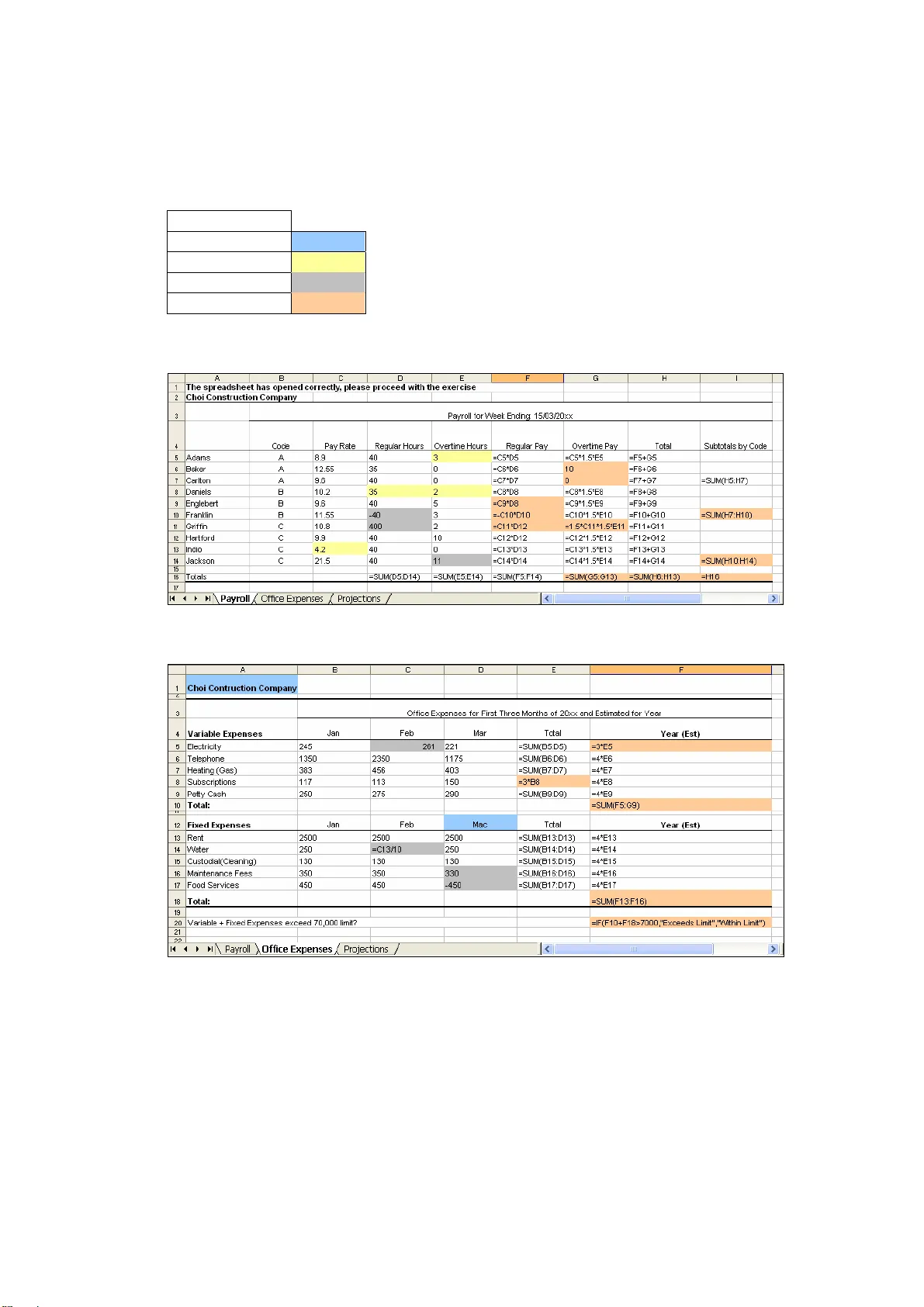
An Empirical Study of End-User Behaviour in Spreadsheet Error Detection & Correction Bishop & McDaid An Empirical Study of End-User Behaviour in Spreadsheet Error Detection & Correction Brian Bishop, Dr. Kevin McDaid Dundalk Institute of Technology, Dundalk, Ireland brian.bishop@dkit.ie , kevin.m cdaid@dkit.ie ABSTRACT Very little is known about th e process by which en d-user developers detect and co rrect spreadsheet errors . Any research pertaining to the development of spreadsheet testing methodologies or au diting tools would bene fit from information on how end-u sers perform the debugging pro cess in practice. Thirt een industry-based professional s and thirty-fo ur accounting & finance students took part in a current ongoing experiment designed to record and analyse end- user behaviour in spread sheet error detection and co rrection. Professionals sign ificantly outperforme d students i n correcting cert ain error types . Time-based cel l activity anal ysis showe d that a strong c orrelation exis ts between the perce ntage of cell s inspected and the n umber of errors corrected. The cell activity data was gat hered through a purpose written VBA Excel plug-in that records the tim e and detail of all cell select ion and cell c hange acti ons of indi viduals. 1. INTRODUCTION The ubiquity of spreadsheet programs within all levels of management in the business world indicates that important decisions are likely to be made based on the results of these, mainly end-user developed, program s. The financial sector is particularly dependent on spreadsheets [Croll, 2005]. Unfo rtunately, the quality and reliability of spreadsheets is known to be poor following em pirical and anecdotal evidence collected on the subject [Panko, 1998], [Rajalingham et al, 2000] and [Chadwick, 2004]. From the experience of one consulting firm, Coopers a nd Lybrand in England, 90% of spreadsheets with over 150 rows of data were found to c ontain one or more faults [Panko, 1998], and due to the nature of spreadsheets, when fa ilures do occur, the results can be quite significant. For example, sudden budget cuts were necessary at the University of Toledo after an erroneous spreadsheet formula infl ated projected annual revenue by $2.4 million [Fisher et al, 2006]. Many spreadsheet auditing tools have been de veloped and are widely available, but to develop auditing tools that compliment end-users natural a uditing and debuggi ng behaviour, research into this behaviour needs to be conducted. T o date, we have found only one study that addresses end-user be haviour/processes in the inspection and debugging of spreadsheets, [ Chen & Chan, 2000]. The study was som ewhat limited as cognitive processes were captured using vide o taping and a thinking-aloud protocol from four participants without spreadsheet and acc ounting expertise. To this end, we undertook to investigate and unintrusively record the behaviour of industry-based professionals and students during the spreadsheet debugging pro cess. Thirteen indust ry-based spreadsheet developers and 34 accounting and finance st udents took part in the experiment. The layout of the paper is as follows. Secti on 2 introduces the topic of spreadsheet error detection and correction and compares the activity of spreadsheet inspection and 165 An Empirical Study of End-User Behaviour in Spreadsheet Error Detection & Correction Bishop & McDaid debugging with that of im perative programming language verification, validation and debugging. Section 3 details our research goals and experiment methodology. In Section 4 initial findings of the experiment are pr esented. A conclusion and proposed future research are detailed in Section 5. 2. SPREADSHEET ERROR DETECTION AND CORRECTION Very little research has been conducted on the error detection process for spr eadsheets. The emphasis of the small amount of spread sheet research available has been on the prevention of spreadsheet errors through spreadsheet design and testing methodologies. The notable exceptions to this are [Chen & Chan, 2000] which is mentioned in the previous section, [Galletta et al, 1993], [Galle tta et al, 199 6], [Panko, 1999] and [Howe & Simpkin, 2006] in which studies on error-finding pe rformance, the effect of spreadsheet presentation in error detection, applying code inspection to spreadsheet testing and the factors affecting the ability to detect spread sheet errors were undertaken respectively. Importantly, none of these papers, unlike our wor k, deal with the cell-by-cell processes by which, or the order in which, these errors are found and corrected. In [Galletta et al, 1996], the author concludes that an increased understanding of the error-finding process could help avert some of the well publicised spreadsheet errors. Authors have in the past looked to the traditional software development domain for methods and tools that could yield spreadsheet process improvement. Exam ples include the application of code inspection to spreadsheet testing [ Panko, 1999], software visualisation applied to spreadsheets for fau lt localisation [Ruthruff et al, 2003] and using test driven development, an eXtreme Programming technique, for developing spreadsheets [Rust et al, 2006]. The applica tion of traditional software verification and validation (V&V) and debugging research to the spreadsheet paradigm would seem like a natural course of action for spreadsheet error detection and correction research, but error detection and debugging in spreadsheets is a combination of static and dynamic V&V, and debugging associated with traditional programming languages. A comparison between spreadsheets and traditional programmi ng languages and the ramifications of the differences with regard to testing techniques and terminology are discussed briefly in the next section. 2.1 Software Verification and Validat ion: Spreadsheets Vs Traditional Programming Languages In traditional software development, verification and validation (V&V) are processes used to determine if the software is being bu ilt correctly and if it the correct software is being built, respectively [Jenkins et al, 199 8]. V&V is concerned with establishing the existence of defects in a system, as distin ct fro m debugging, which is concerned with locating and repairing these defects once th eir existence is established [Sommerville, 2004]. Software verification is composed of both static and dynamic verification. Static verification involves the inspection of code and other development artifacts. It is static in nature in that the system is not exercised in the examination of the code or documents. Dynamic verification involves program testing, concerned with exercising and observing program behaviour [Sommerville, 2004]. They are two distinct processes. In the spreadsheet paradigm, code inspection (i ndividual phase) and the debugging process invariably become amalgamated. In the spreadsheet debugging process, where the sought error is found and corrected, the spreadsheet updates all cells. In this way the implication of the change can been seen immediately . This is similar to the dynamic verification 166 An Empirical Study of End-User Behaviour in Spreadsheet Error Detection & Correction Bishop & McDaid process of software testi ng. What can be take n from this is that static verification, dynamic verification, and debugging in traditional software development are three distinct processes, whereas spreadsheet debuggi ng involves the integration of these into a single process. Further differences between spreadsheet and imperative progra mming paradigms, and the ramifications these diffe rences may have for spreadsheet testing methodologies have been addressed in [Rothermel et al, 2001]. The terms spreadsheet auditing, debugging, in spection, testing, error findi ng etc. are sometimes used interchangeably in spreadsheet literature. Fo r the purposes of this paper, spreadsheet error detection refers to the in spection by an individual of the spreadsheet code and the discovery of any errors, error co rrection refers to the successful correction of discovered errors, and spreadsheet debugging refers to the combination of these processes. 3. ANALYSING END-USER BEHAV IOUR: RESEARCH GOALS AND METHODOLOGY 3.1 Research Questions Some questions we seek to answer are as follows: • Will industry-based spreadsheet developers outperform students in detecting and correcting certain types of errors? • Is there a correlation between the number of cells inspected and error detection and correction performance? • Can common patterns of spreadsheet de bugging behaviour be identified, and are there particular patterns that are more effective than others? The research is in its early to mid stages, and many questions and hypothesis have yet to be answered and tested respectively. Initial analysis and some interesting findings from our first experiment are presented in Section 4. The following section details the experiment methodology. 3.2 Methodology Experimental Spreadsheet Model Regarding the detail of the experiment, a spreadsheet model has been developed consisting of three worksheets seeded with errors (see Appendix A). The names and functions of each of the three worksheets are as follows: Payroll , compute typical payroll expenses; Office Expenses , compute office expenses; Projections , perform a 5- year projection of future expenses. Each work sheet has different error characteristics. Payroll has data entry, rule violation and formula errors; Office Expenses has clerical, data entry and formula errors; Projections has mostly formula errors. Participants were asked to debug the sp readsheet, and each error found was to be corrected directly in the spreadsheet itsel f. The spreadsheet model was adapted from a previous experiment carried out b y Howe & Simpkin [2006], in which 228 students took part in an experiment designed to identif y the factors which influence error-detection capability. Among other advantages, using a similar spreadsheet model to the one detailed in [Howe & Simpkin, 2006] allows us to compare results obtained from a large number of students with those of industry-based professionals. 167 An Empirical Study of End-User Behaviour in Spreadsheet Error Detection & Correction Bishop & McDaid Although other error classification systems exist [Teo & Tan, 1997], [Panko, 19 98] , the error classification system from [Howe & Simpkin, 2006] was utilised for this experiment, mainly to allow for detailed comparisons to be made between the error detection results of the 13 professionals and 34 students from our study and the 228 students from the experiment detailed in [H owe & Simpkin, 2006]. The error categories, and number of seeded errors of each category, are as follows. Clerical/Non material errors (4), such as spelling errors. Rule Violations (4) are cell entries that violate company policy, for example paying an employee overtime when that employee is not eligible for overtime. Data Entry errors (8) include negative values, numbers entered as text etc. Formula Errors (26), such as inaccurate range refe rences, illogical formulas etc. Spreadsheet Cell Activity Tracking Tool Crucially, a tool has been developed (in VBA) to record the time and detail of all cell selection and cell change actions of individua ls while debugging a spreadsheet. The data recorded is as follows: individual cells selected, cell ranges selected, worksheet selections, individual cells edited & the resu lting cell value, cell ranges edited & resulting cell values. Timestamps are recorded for all of these activities (in milliseconds). More complex spreadsheet activities can also be id entified from the resulting data log. These include copy and past, undo typing, redo typing and drag-and-fill. Sample Thirteen industry-based spreadsheet developers took part in the experiment, along with thirty-four second year accounting & fina nce students. The backgrounds of the professional participants are as follows: Accountants, 8; Financial Analysts, 2; Actuaries, 1; Software Developers, 2; with all the professional participants, including the two software development participants, having an industry based working knowledge of spreadsheet development and u se. The need for spreadsheet experiments with industry professionals as opposed to the student population has been voiced by many researchers in this area, including the authors of the aforementioned paper, Howe & Sim pkin [2006]. For comparison purposes the experiment w as also carried out with 34 second year accounting and finance students. Process The subjects were given a copy of the experimental spreadsheet along with an instructions page. A short introduction on the instructions page ex plained the purpose of the task, namely to investigate how effec tively spreadsheet users discover and correct errors. Subjects were asked to correct any erro rs found directly on the spreadsheet itself. The instructions page also contained some rules with regards to the data in the worksheets e.g. only employees with codes B or C are eligible to receive overtime pay. Both the spreadsheet and the instructions were emailed to each of the industry-based professional subjects after they had been contacted and had agreed to take part. The student subjects were given the opportunity during a single 60 minute class period to participate in the study. No time limit was given to the professional subjects, but as pretests suggested, professional subjects complete d the task in an average of 28 minutes, and student subjects in an average 36 minutes. The students knew in advance that a spreadsheet debugging exercise had been arranged, and the general feeling was that participants, both professional and student, approached the task as an interesting challenge. Subjects were told that cell activities were being recorded during the 168 An Empirical Study of End-User Behaviour in Spreadsheet Error Detection & Correction Bishop & McDaid debugging process, and that all individual results would remain confidential. Subjects were given contact details of the authors to request individual results. 4. INITIAL FINDINGS Initial findings from analysis of the data recorded during the experiment and error correction results are detailed in the following sections. 4.1 Overall Results Error Correction Rates Industry-based professional subjects corrected 72% of all seeded errors and student subjects corrected 58% of all seeded errors. The results fro m Figure 1 show a clear distinction between performances of industr y based professionals and students for Rule Violation and Formula errors, with professi onals correcting 16% more formula errors than students and 20% more rule violation errors. Error Type No. of Seeded Errors % Errors Corrected by Professionals % Errors Corrected by Students Professionals Compared to Students [Howe & Simpkin, 2006] Students Clerical/Non- Material 4 17% 11% + 6% 66% Rules Violation 4 85% 65% + 20% 60% Data Entry 8 68% 63% + 5% 72% Formula 26 79% 63% + 16% 54% Total 72% 58% + 14% 67% Figure 1 – Error Correction Results Error Correction Performance: Expert Vs Novice The spreadsheet used in this e xperiment is almost identical (but for six less clerical and five more material errors) to that used by the authors of [Howe & Simpkin, 2006]. This allows for a detailed comparison between resu lts. The mean error detection rate f rom [Howe & Simpkin, 2006] was 67%, with subjects detecting 66% clerical, 60% rule violation, 72% data entry, and 54% f orm ula errors. Students from both experiments yielded similar results, with the exception of clerical errors. The spreadsheet used by [Howe & Simpkin, 2006] had 10 clerical errors, and students were informed that clerical/spelling errors may be on the spreadsheet; 66% were detected. Students and professionals from our experiment found only 11% and 17% of the 4 clerical errors respectively. They showed little interest in detecting them, and most professionals thought them irrelevant. When comparing the formula and rule-violation error detection rates of students in [Howe & Simpkin, 2006] and the profe ssional subjects in our experiment, the professional subjects corrected 25% more formula errors and 25% more rule-violation errors. Although the overall average error correction results shown in Figure 1 are sim ilar to those of [Howe & Simpkin, 2006] , the differen ce in error correction rates for some of the 169 An Empirical Study of End-User Behaviour in Spreadsheet Error Detection & Correction Bishop & McDaid error categories, particularly formula errors , between professionals from our experiment and students from both experim ents is quite signi ficant. This finding is contrary to the findings presented in [Galletta et al, 1993] , in which spreadsheet experts did not outperform novices in detecting spreadsheet formula errors. The findings from [Galletta et al, 1993] suggest that spreadsheet expertise is not crucial for discovering errors strictly affecting spreadsheet formulas and structure. As the spreadsheet model used in our experiment was not complicated and did not req uire much, if any, dom ain knowledge, and given that the participating students in our experiment were them selves accounting & finance students (diminishing further the doma in expertise factor), this leads to a conclusion that industry-based professi onals with a good working knowledge of spreadsheets i.e. experts, find and correct more formula errors in less time than end-users with little or no industry-based spreadsheet experience i.e. novices. One important element that ma y be a contributi ng factor to the differences in the findings of this experiment and that of [Galletta et al, 1993], with regards to spreadsheet expertise and formula error detection and correction performance, is the employment of self- reported measures to establish spreadsheet e xpertise used in [Galletta et al, 1993]. The professional subjects who took part in the experiment detailed in this paper were known to have a good industry-based working knowle dge of spreadsheet use and development prior to their involvement in the experiment. Determining Possible Group Co de-Inspection Phase Ben efits In this experiment subjects inspected the sp readsheets individually; there was no group code inspection phase of any kind. In an a ttempt to determine what the average error correction yield might have been if individuals had been placed in groups of three, all combinations of three students were created and the number of separate errors corrected identified. The average performance acr oss a ll combinations was calculated to r epresent the likely performance on average of a group of three students. This method assumes that there is no added benefit of wo rking i n groups of three beyond the sharing of i nformation. The result of this process suggested that on av erage 81% of the errors would have been corrected if result pooling in groups of three was performed successfu lly. In a past study [Panko, 1999] the individual spreadsheet c ode inspection phase was followed by a group code inspection phase, using groups of three. It was found in that study that the gain from group-work came only from pooling the differe nt errors detected previously by the individuals. The result of 81% is con sistent with the 83% yield from grou p-work in [Panko, 1999]. 4.2 Cells Inspected Versus Debugging Performance With the data recorded during the spreadsheet debugging pr ocess it is possible to identify any cells that were inspected or edited. It is also possible to dete rmine the number of times each cell was inspected and to determine the time spent inspecting each cell. An important research goal was to determine if there was a correlati on between the number of cells inspected and error detection/correc tion performance. To answer this question, analysis was conducted to identify, for each subject, the number of individual cells inspected or edited during the debuggi ng process. A cell was considered inspected/checked if that cell was selected fo r a sp ecified minimum time or if the cell value/formula was edited or changed directly, and if the cell was within a specified range of cells. The specified ranges of cells for this analysis were cells that contained formulas/values. Blank cells and column/row headings were not included. For this analysis there were 44 usable results, as ti me da ta had not been recorded correctly for one of the students and two of the professionals. 170 An Empirical Study of End-User Behaviour in Spreadsheet Error Detection & Correction Bishop & McDaid Figure 2 shows a scatterplot for errors co rrected versus coverage including a linear regression model for 44 subjects (no time data for one student and two professionals), where the minimum time specified for a cell to be considered inspected/checked is >0.3 seconds. It is evident from Figure 2 that a m oderate-strong relationship exists between the number of cells inspected and error detection/correction performance: R 2 value of 0.6421. R 2 = 0. 6421 0 10 20 30 40 50 60 70 80 90 100 0 1 02 0 3 04 05 06 07 0 8 09 0 1 0 0 % C ells Ins pe c t ed ( >0 .3 s ec & a ny e dit s ) % Erro rs C o rrect ed Figure 2 – Errors Corrected ov er Cells Inspected (>0.3sec) Figure 3 shows a scatterplot for errors co rrected versus coverage including a linear regression model for the same 44 subjects, with the sa me specified cell range, where the minimum time specified for a cell to be considered inspected/checked is >1 second: R 2 value of 0.607 shows a similarly moderate-strong linear relationship. R 2 = 0. 607 0 10 20 30 40 50 60 70 80 90 100 0 1 02 0 3 04 05 06 07 0 8 09 0 1 0 0 % C e l l s I n sp e c t e d ( > 1 se c & a n y e d i t s) % E rro rs Correct ed Figure 3 – Errors Corrected ov er Cells Inspected (>1sec) 171 An Empirical Study of End-User Behaviour in Spreadsheet Error Detection & Correction Bishop & McDaid A possible application of this research may be as a predictor of spreadsheet reliability based on relevant past error density and debugging performance information and the percentage of critical cells inspected. The remainder of the analysis focuses on the debuggi ng behaviour of professional participants. 4.3 Unique Formula Debugging Analysis: IF Statement Initial analysis was carried out on the time based aspect of the spreadsheet trial regarding professional subjects debugging behaviour of a un ique IF formula. The IF formula, see Appendix A – Office Expenses F20 , was as follows: =IF(F10+F18>7000,"Exceeds Limit","Within Limit") The formula was incorrect, and should have been corrected by changing the 7,000 to 70,000. This change requirement was m ade known through instructions on the spreadsheet itself. Of the professional subject s, 38% amended the formula correctly. An aspect of professional subject’s behaviour that stood out when the resulting data logs were analysed, is that nearly all professional subjects checked/debugged the formula exactly twice, with none amending the formula correctly on their second visit to the cell. The average times spent inspecti ng the cell for professional participants who amended the cell correctly was 14 seconds on the first vis it and 12 seconds on the second visit, those who did not correct the cell formula spent sli ghtly less time inspecting the cell. Although time based analysis has not been carrie d out on this formula cell for the student subjects, results showed that 58% of the students amended this cell correctly. It may be the case that the professional subjects easily understood the logic of the IF form ula, and missed the simple error by not inspecting the for mula more thoroughly. 4.4 Remote Sheet Reference Debugging Analysis was carried out on the behaviour of professional participants in debugging an incorrect formula that included a remote cell refere nce (a reference to a cell value on a different worksheet within the same workbook) . The original and correct value of this formula, see Appendix A – Projections B19, is as follows: Original Formula Correct Formula ='Office Expenses'!F10*4 ='Office Expenses'!F18 Thirty-eight percent of professional participan ts corrected this formula error. It was identified that although only 38% of particip ants discovered and correctly amended the formula, 46% discovered the error but amended it incorrectly. This finding implies that while error detection and error correction are both part of the debugging process, they are still two distinct disciplines, and an individua l ’s error detection capability should not be used as an automatic indication of their ability to correct errors found. Of the student subjects, only 12% corrected this error. A reason for the very low correction rate for th is formula could b e that participants only discovered one of the two errors in the formul a, and did not consider that there could be more than one error; a mechanical and a logical error. The cell value of ‘Office Expenses’!F18 was a yearly estimate, calculated by a formula that added a range of 3- 172 An Empirical Study of End-User Behaviour in Spreadsheet Error Detection & Correction Bishop & McDaid month estimates which had been multiplied by 4. An incorrect cell was referenced - a mechanical error, and multiply ing the remote cell value by 4 was a logical error; as the relevant remote cell value had effectively b een multiplied by 4 already. Of the 46% of professional subjects who discovered the error but amended it incorrectly, 66% of them found the mechanical error but missed the logical error. Microsoft Excel provides a useful show-precedents auditing tool for inspecting cell formulas, where arrows indicate cells th at are referred to by a formula. A proble m with this tool occurs when a precedent is on anot her worksheet. Excel simply lets the user know that a remote cell is being referenced by displaying an icon. Double clicking this icon allows one to go directly to the refere nced cell, which entails leaving the sheet currently being inspected. This can be very confusing. The error described above may have had a higher correction rate if relevant information on the remote cell was available without leaving the worksheet currently being inspected. This information could include the remote cells value and formula, the co lumn an d row headings associated with the remote cell, the remote cells prec edents etc. Further analysis regarding the most and least detected errors was conducted, but is not detailed here. 5. CONCLUSION Spreadsheets are designed, built and used by a variety of users, many of whom are not professional programmers and are not inclined towards following or learning software development and testing methodologies. This is a major contributing factor to the unreliability of spreadsheets. With the aim of aiding end-users in improving spreadsheet reliability, many spreadsheet auditing and de bugging tools have been developed and made available, but tools should support u sers’ natural debuggi ng behaviour. This paper describes an experiment conducted with thirt een industry-based professionals and thirty- four accounting & finance students designed to unintrusively record end-user b ehaviour in spreadsheet error detection and correction activities. An experimental spreadsheet model was developed and subjects were asked to correct any errors found directly on the spreadsheet itself. Overall results show that professionals (experts) are more efficient and effective spreadsheet debuggers than students (novices). Professional subjects outperformed student subjects in detecting and correcti ng errors of certain categories, namely formula errors, with a 16%-25% greater correction rate. Future analysis will aim at identifying the factors and behaviours that contribute to better deb ugging performance. An im portant finding is that a relationship exists between the percentage of critical cells inspected and the number of errors detected and corrected. In traditional software testing, pre dicting the reliability of software programs based on code coverage and defect density is a tried and tested method, which could possibly be applied to th e spreadsheet paradigm. This study utilises a small, well-structured spreadsh eet. But the question remains whether the findings can be applied to larger, poorly-struc tured spreadsheets. We believe that experts would outperform novices in debugging regardless, but that greater variance in debugging behaviour would occur with larger, real-world spreadsheets. The future aims of this study are to provide practical information for improving spreadsheet reliability by conducting further experiments and analysis in the near future, and possibly developing a spreadsheet debugging tool based on th e experiment findings. REFERENCES Chadwick, D. (2004), “Stop That Subversive Spreadsh eet”, EuSpRIG Conference 2004, Program, Abstracts and Outlines 173 An Empirical Study of End-User Behaviour in Spreadsheet Error Detection & Correction Bishop & McDaid Chen, Y. and Chan, H. C. (2000), “An Exploratory Study of Spreadsheet Debugging Processes”, 4th Pacific Asia Conference on Inform ation S ystems, 2000, 143-155 Croll, G. (2005), “The importance and critic ality of sp readsheets in the city of London”. Proceedings of the European Spreadsheet Risks Interest Group, 2005. Fisher, M., II, Rothermel, G., et al, (2006), “Integ rating Auto mated Test Generation into the WYSIWYT Spreadsheet Testing Methodology”, ACM Transactions on Software Engineering and Methodolog y, April 2006, Vol. 15, Issue 2 Galletta, D.F., Abraham, D., El L ouadi, M., Lekse, W., Pollailis, Y. A. and Sam pler, J.L. (1993), “An Empirical Study of Spreadsheet Error-Finding Perfo rmance”, Journal of Acco unting, Management, and Information Technology (3:2) April-June, pp. 79-95 Galletta, D.F., Hartzel, K.S ., Johnson, S., Joseph, J. and Rustagi, S. (1996), “An Experimental Study of Spreadsheet Presentation and Error Detection”, Proceedings of the 29 th Annual Hawaii International Conference on System Sc iences Howe, H. and Simpkin, M.G. (2006), “Factors Affecting th e Ability to Detect Spread sheet Errors”, Decision Sciences Journal of Innovative E ducation, Januar y 2006/Vol.4, No. 1 Jenkins, R., Deshpande, Y. and Davison, G. (1998), “V erif ication and validation and complex environments: a study in service sector” , Proceedi ngs of the 1998 Winter Simulati on Conference, Jan 2001, Vol. 10, Issue 1 Panko, R. (1998), “What We Know About Spreadshee t Errors”, Journal of End User Computing 10, 2 (Spring), p15–21 Panko, R. (1999), “Applying Code Inspection to Spread sheet Testing”, Journal of Management Information Systems, Vol. 16, No. 2, pp. 159-176. Rajalingham, K., Chadwick, D., Knight, B., et al. ( 2000) , “Quality Control in Spreadsheets: A Software Engineering-Based Approach to Spreads heet Development”, Proceeding of the 33 rd Hawaii International Conference on System S ciences, IEEE . Vol. 33 Rothermel, G., Burnett, M., Li, L., Dupuis , C. and Sheretov, A. (2001), “A Methodology for Testing Spreadsheets”, ACM Transactions on Softwa re Engineering and Methodology (TOSEM) , Volume 10 , Issue 1 (January 2001) Rust, A., Bishop, B., McDaid, K. (2006) “Test-Driven Development: Can it Work for Spreadsheet Engineering”, Extreme Programming and Agile Processes in Software Engineering 7th I nternational Conference, Proceedings. 2006, P209-210 Ruthruff, J., Creswick, E., Burnett, M., Cook, C., Pr abh akararao, S., Fisher II.M. And Main, M. (2003), “End-user Software Visualizations for Fault Localization” , Proceedings of the 2003 ACM Symposium on Software Visualization, P.123 - 132 Sommerville, I. (7th ed ition) (2004), “Software Engineering”, Addison W esley Teo, T.S.H. and Tan, M. (19 97), “Quantitative a nd Qual itative Errors in Spreadsheet Dev elopment”. Proceedings of the Th irtieth Hawaii In ternational Confer ence on S ystem Sciences, Maui, Haw aii. 174 An Empirical Study of End-User Behaviour in Spreadsheet Error Detection & Correction Bishop & McDaid Appendix A – Experimental Spreadsheet Model with Errors Colour Coded Error Colour Codes Error Types Clerical Rule Violation Data Entry Formula Payroll Worksheet Office Expenses Worksheet 175 An Empirical Study of End-User Behaviour in Spreadsheet Error Detection & Correction Bishop & McDaid Projections Worksheet 176
Original Paper
Loading high-quality paper...
Comments & Academic Discussion
Loading comments...
Leave a Comment